GBP Attributes: Prove Agency Wins With Geo Grid Scans
GBP Attributes: Prove Agency Wins With Geo Grid Scans
GBP attributes are the structured labels on a Google Business Profile that tell Google and searchers exactly what a business offers, from wheelchair access to outdoor seating to accepted payment types. They matter because populated attributes determine whether a profile surfaces in attribute-filtered searches and feeds the structured data AI assistants rely on for voice and chat-based local queries. Availability shifts by category and region, which is why so many profiles miss attributes they qualify for.
TL;DR:
- Only fill out attributes relevant to the business category, such as dining-specific options for restaurants or amenities for hotels, to ensure they appear in filters.
- Availability of attributes varies by region and category; regularly audit attribute sets using the attributes.list API to prevent mismatches across locations and markets.
- Prioritize high-impact attributes like accessibility features, payment options, and delivery, as they directly influence filter-driven searches and customer decisions.
- Consistently verify and update attributes using the API for bulk management and track changes with geo-grid rank scans to confirm visibility improvements.
- Accurate attribute information feeds AI assistants and voice search, making ongoing governance and proof of updates essential for sustained local discoverability.
Table of Contents
- What Are GBP Attributes, and Where Do They Show Up?
- Why Does Attribute Availability Change by Category and Region?
- How Do You Add, Edit, and Verify GBP Attributes?
- Which Attributes Actually Move the Needle?
- How Should Agencies Audit Attributes at Scale?
- Attributes Are Becoming the Language AI Assistants Read First
- Turning Attribute Edits Into Visible Proof for Clients
- Where to Go Deeper on GBP Attributes
- Sources
- FAQ
What Are GBP Attributes, and Where Do They Show Up?
Attributes are structured data points attached to a Google Business Profile, distinct from the free-text description or the primary category itself. They surface as small tags and filter options on both Google Search and Google Maps, letting someone searching “coffee shop with outdoor seating near me” filter results down to profiles that have actually flagged that feature.
Some attributes are factual and merchant-set, meaning the business controls them directly: a wheelchair-accessible entrance, free Wi-Fi, accepted payment types, delivery availability. Others are subjective or user-derived, populated from customer feedback or Google’s own signals rather than anything the owner typed in, such as “great for groups” or a “women-led” designation. Google’s own guidance splits attributes into groups including Accessibility, Amenities, Dining Options, Health & Safety, Payments, and Service Options.
Common examples worth knowing:
- Accessibility: wheelchair-accessible entrance, parking, and restroom
- Amenities: free Wi-Fi, outdoor seating, restroom on site
- Payments: credit cards, checks, mobile payments, cash-only
- Health & Safety: staff wear masks, requires appointments
- Highlights: identity-based attributes like women-led or veteran-led
You control the merchant-set ones directly. The user-derived ones you can influence, but never dictate outright.
Why Does Attribute Availability Change by Category and Region?
Primary category is the single biggest factor in which attributes even show up as options. A restaurant profile unlocks dining-specific attributes like “outdoor seating” or “serves dinner.” A hotel profile unlocks amenities like “free breakfast” or “pool.” A law firm gets neither, because those attributes simply don’t apply to that vertical.

Region matters almost as much. Google’s attributes.list endpoint accepts a categoryName and regionCode, and the returned attribute set can differ between markets even for the same business type. Localized display names shift too. A payment attribute might read differently in a German-language profile than in an American English one, even though the underlying attribute ID stays the same.
For agencies managing dozens or hundreds of locations, this creates a real audit problem:
- Two locations in the same chain, different countries, can show different attribute menus
- A category change (even a minor one) can add or remove entire attribute groups
- Attributes marked deprecated in the metadata will stop saving eventually, even if they’re still visible in the UI
Running attributes.list per category and region before a client onboarding catches mismatches most agencies never notice until a client asks why a competitor’s profile “has more filters” than theirs.
How Do You Add, Edit, and Verify GBP Attributes?
Manual edits happen inside the Business Profile itself, and the flow is short once you know where to look:
- Open the Business Profile and go to the “Edit profile” or “Business information” section.
- Select “Attributes” from the left-side menu, which loads only the attributes available for that profile’s current primary category.
- Toggle or select the relevant attributes and save. Google typically reflects changes within a few days, though some subjective attributes take longer since they depend on user-generated signals.
For agencies managing profiles at scale, the Business Profile API does the same job programmatically. Call attributes.list first to discover what’s available for a given category and region, then use locations.updateAttributes with an attributeMask to set specific values without touching unrelated profile fields. To confirm what’s actually live, locations.attributes.getGoogleUpdated pulls the current values as Search and Maps display them, which can differ from what you last set.
A few nuances worth knowing before you script this: some attributes accept repeatable enum values (multiple payment types in one field), others take a single value or a URI, and deprecated attributes flagged in the metadata should be dropped from your update logic rather than patched.
Pro Tip: Always call attributes.list right before a bulk update, not once at project start. Google adds, removes, and renames attributes without much fanfare, and a stale attribute ID silently fails to save.
Which Attributes Actually Move the Needle?
Not every available attribute deserves equal attention. Prioritize the ones that map to genuine high-intent, filterable searches: accessibility features, payment options, curbside pickup or delivery, Wi-Fi, and outdoor seating consistently show up in attribute-filtered queries because they’re the features people actually search by when deciding between two similar businesses nearby.
Accuracy matters more than volume here. An attribute that overstates what a business offers, like claiming wheelchair access that doesn’t exist, creates a bad experience for the customer who shows up expecting it, and repeated inaccuracies can trigger a suspension review. Match attributes only to services the business genuinely provides.
- Run a geo-grid scan before adding new attributes, then run another after Google reflects the changes, to isolate the visibility shift
- Track map-pack coverage specifically in the neighborhoods where competitors show attribute tags you don’t
- Watch for changes in attribute-filtered query impressions where available in Search Console or profile insights
- Encourage satisfied customers to leave reviews mentioning accessibility or amenities, since Google sources some subjective attributes from that exact language
Pro Tip: If a client claims an attribute doesn’t matter for their category, check it anyway. “Identifies as women-led” and similar highlight attributes have measurably increased profile engagement for the businesses that use them accurately, per Search Engine Journal’s local SEO reporting.
How Should Agencies Audit Attributes at Scale?
Attribute metadata isn’t static, and treating it as a set-and-forget checklist is how agencies end up with stale profiles. A practical cadence: refresh attributes.list weekly for volatile categories like restaurants and hotels, where seasonal menus and amenities shift often, and monthly for stable categories like professional services. Trigger an immediate refresh any time a client changes hours, adds a service line, or moves locations.
The harder problem is reconciling what you set against what Google actually shows. Merchant-set values and Google-populated values can diverge, especially for subjective attributes drawn from customer behavior. Calling locations.attributes.getGoogleUpdated on a schedule and comparing it against your own records surfaces those mismatches before a client notices them first.
- Patch narrowly with
attributeMaskso a single attribute update never overwrites unrelated fields - Log every Google-populated change alongside merchant-set values in a client-facing audit sheet
- Pair attribute changes with a geo-grid rank scan to see whether visibility actually shifted in specific neighborhoods, not just profile-wide
That pairing, attribute change plus grid scan, is the only way to prove an attribute edit did anything measurable, rather than assuming it helped because the checklist item is now checked.
Attributes Are Becoming the Language AI Assistants Read First
Attributes give AI agents and voice assistants exact, machine-readable facts instead of guesswork pulled from a description field. That shift changes what “profile completeness” even means. For multi-location brands, governance now matters as much as the edits themselves: someone has to own the audit, not just the initial setup.
Agencies that tie attribute work to a measurable KPI, like getting cited by AI assistants or a visibility shift in a specific ZIP code, will outlast the ones still treating attributes as a box to check once and forget.
— Local
Turning Attribute Edits Into Visible Proof for Clients
Filling out attributes correctly is only half the job. Proving it worked is the part clients actually pay attention to, and that’s where most agencies go quiet because they have no way to show a before-and-after picture. Grid rank tracking tools designed for agencies allow running scans across a custom grid of a client’s service area before and after an attribute update, enabling the delivery of white-labeled reports that show which neighborhoods gained map-pack visibility.
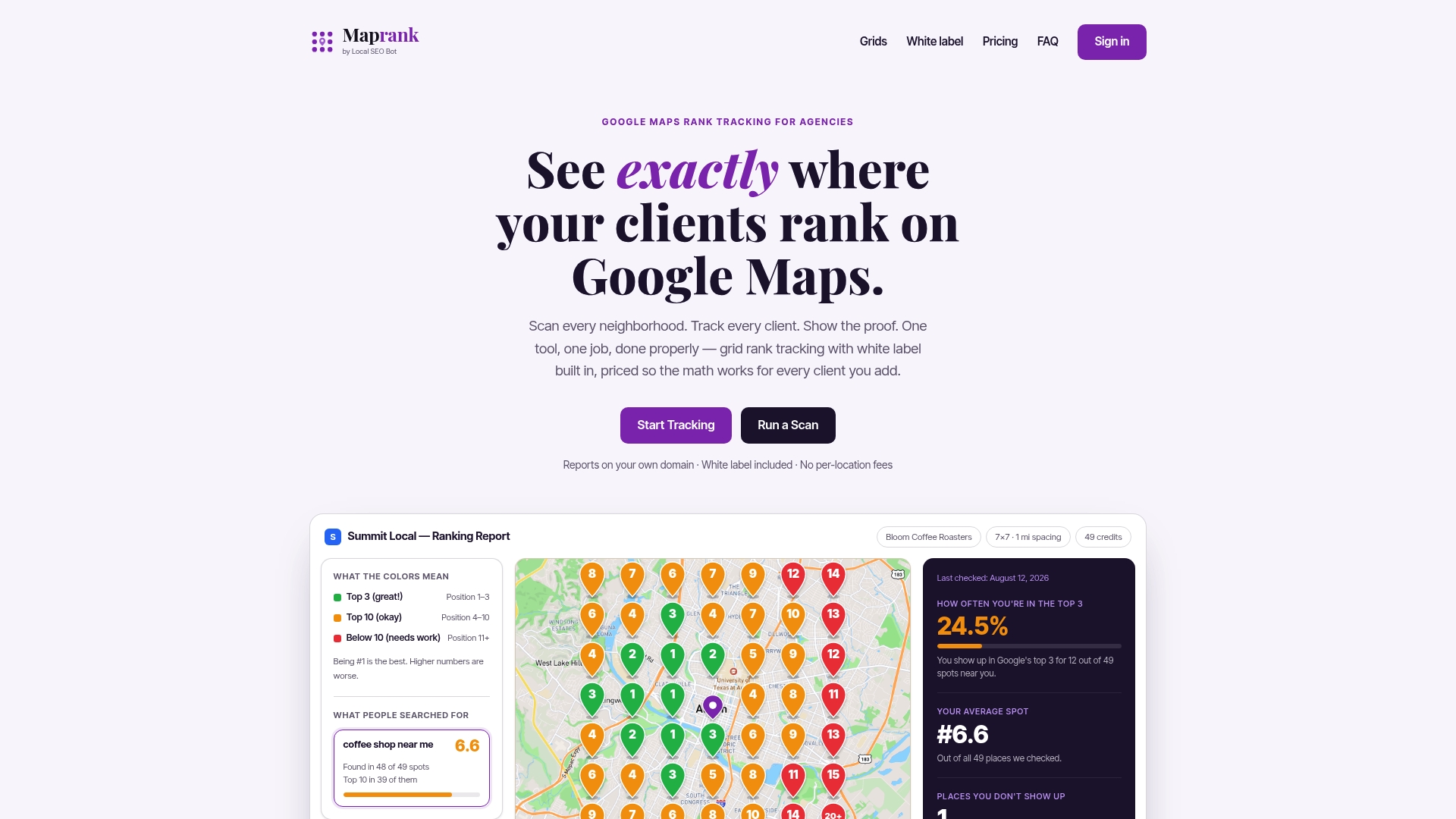
Some grid rank trackers don’t require a Google account connection, allowing tracking of attribute-driven changes across a client’s whole footprint without the login friction that can slow down other rank trackers. Pricing can run on straightforward scan credits instead of per-location fees, and some plans include unlimited businesses, meaning agencies managing multiple locations pay the same structure as those managing fewer. If you’re about to roll out an attribute update for a client, run a geo-grid scan first to capture the baseline, then scan again once Google reflects the changes.
Where to Go Deeper on GBP Attributes
- Google’s own attribute management guide covers UI steps and the merchant vs. Google-updated distinction.
- The attributes.list API reference documents programmatic discovery and update methods.
- Search Engine Journal’s attribute guide offers strategic context for prioritizing high-value attributes.
Sources
- Manage your business attributes
- Attributes | Google Business Profile APIs | Google for Developers
- The Complete Guide to Google Attributes for Local SEO
FAQ
What Are Some Good Business Attributes to Add First?
Start with accessibility features, accepted payment types, Wi-Fi availability, and delivery or curbside options, since these map directly to the filtered searches people actually run before choosing a business.
How Do I Optimize My Google Business Profile Beyond Attributes?
Attributes are one piece; complete profiles also need accurate hours, current photos, and a fully filled-out primary category, since Google itself notes that completeness drives discoverability and trust.
What Are Google Attributes, Exactly?
They’re optional, category-specific data fields on a Business Profile that describe amenities, services, and accessibility features, and they can be either merchant-set or populated from user signals.
My Google Business Profile Is Suspended. How Can I Fix It?
Suspensions usually stem from policy violations like inaccurate business information or attributes that misrepresent what’s actually offered, so review your listed attributes for accuracy and request reinstatement through Google’s support process once corrected.
Do GBP Attributes Actually Affect Ranking?
They affect discoverability more directly than raw ranking: filled attributes let a profile appear in attribute-filtered queries and structured voice or AI searches it would otherwise be excluded from entirely, based on industry local SEO guidance.