Google Maps rank tracking tool
The Google Maps rank tracker that shows the whole map.
Ask any tracker "where do we rank?" and you'll get a number. The trouble is, on Google Maps that number is different on every street. Maprank scans a whole grid of points across your market and shows the answer the way it actually exists — as a map, street by street, with nowhere to hide.
By creating an account you agree to the Terms of Service and Privacy Policy.
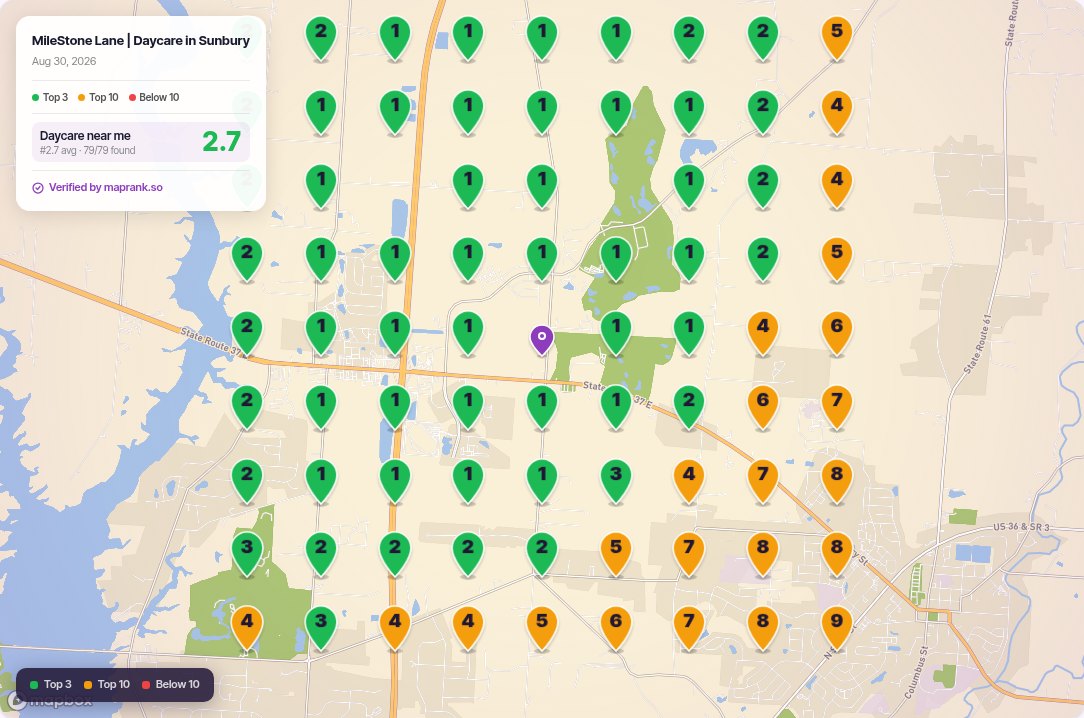
A real Maprank scan. Each pin is one spot in town, colored by where the business ranks there.
Why track Google Maps rankings on a grid
One number lies. A grid tells the truth.
Rankings move with the searcher
Google Maps ranks by proximity, so "we're #2" is only true from one spot. A grid scan records your position from every point across town, so you stop arguing with a number nobody else can reproduce.
Coverage, not a vanity rank
Every scan reports how often you land in the top 3, your average position, and — most useful of all — the parts of the map where you don't appear. That last one is where the lost business lives.
Movement you can prove
Scan again next month and the same grid shows what changed. Ranking movement a client can see on a map beats a spreadsheet row every time.
What the grid is measuring
The three levers behind every Maps ranking.
Google has said for years that local results weigh proximity, relevance and prominence — how close you are to the searcher, how well your listing matches what they typed, and how established the business looks to Google. A grid scan is useful precisely because it separates those levers on a map.
Proximity you can't change: it's the green halo around your pin, and it fades with distance no matter what you do. What a Google Maps ranking tracker shows you is everything beyondthe halo — the blocks where relevance and prominence are supposed to carry you past nearer competitors, and whether they actually do. If a rival across town outranks you in your own neighborhood, that isn't proximity; that's a relevance or prominence gap you can work on.
That's also why tracking over time matters more than any single scan. Categories, review velocity, photos and citations all move slowly; on a one-point tracker their effect drowns in noise. On a grid, progress is visible as geography — the green core widening by a few blocks a month — which is both a truer signal and a far easier thing to show a client.
Map pack rank tracker
The top 3 is the whole game. Track it.
Local customers rarely scroll past the map pack — the three listings Google shows first. Every Maprank scan leads with your top-3 percentage: the share of your market that actually sees you where it counts.
- Top-3 coverage on every scan, as a percentage of grid points
- Average position across the whole grid, not one lucky spot
- The exact areas where you fall out of the pack
- Positions tracked to the top 20 at every point
How to track Google Maps rankings in three steps
1. Add the business by name — the way a searcher finds it. No Google account to connect, no client hand-holding, no waiting on access.
2. Run a scan on your grid — any odd size your plan allows, up to 21×21, at any spacing in miles. A dense downtown wants tight quarter-mile blocks; a rural service area wants five-mile spacing. Your call, per business.
3. Share the proof — one read-only link, branded as your agency (on your own domain from Pro). No login for the client, no seat used.
From scan to strategy
What you do with a grid once you have one.
Baseline every client
First week of an engagement: scan each core keyword once. The opening grid is the honest "before" photo, and it often sells the strategy by itself — nobody argues with a map that shows them missing from half their own city.
Aim the work at the map
A weak quadrant is a to-do list with coordinates: competitors to study there, citations and content to build for that side of town, review requests aimed at customers from those blocks. Generic SEO becomes targeted work.
Re-scan on a rhythm
Same grid, same keyword, monthly. The deltas become the client report, and the trend line becomes the renewal conversation. Consistency is what turns a checker into a tracker.
Why we built it this way
A short story about the number 3.
Here's the conversation that made us build a grid tracker instead of another keyword-position tool. An agency shows a client the monthly report: "you rank #3 for emergency plumber." The client, understandably, searches it — from their kitchen, two blocks from the shop — and sees themselves at #1. Now the agency looks like it can't count. Next month the client searches from a job site across town, sees themselves nowhere, and now the agency looks like it's hiding something. Nobody lied. The number was just pretending a city is one place.
A map ends that conversation. #1 near the shop, #3 across the core, gone east of the river — all three things are true at once, and the client can see their own kitchen on it. The report stops being a number to argue about and starts being a plan: that red corner is where the review push and the service pages point next. The agencies we built this for tell us the grid map is the one deliverable clients forward to their business partners unprompted. That's the job.
If you just want today's answer before committing to tracking, start with a one-off rank check— same scan, run once. Curious how the method works under the hood? That's the geo grid explainer. And if you're comparing tools, we've done the honest homework against Local Falcon and BrightLocal, published prices and all.
Stop overpaying for rank trackers
Pricing you can do in your head.
No feature matrix, no per-location fees, no sales call. A 7×7 scan costs 49 credits because it scans 49 points, and plans start at $19 for 4,900 credits a month (about 100 scans) — white label included. See the full plans.
From $19 a month
Maprank Solo: 4,900 credits a month (about 100 scans), with white label and unlimited businesses included, not gated.
No per-location fees
Adding a business costs nothing on any plan. Only scans spend credits, so a fifty-location roster doesn't need a fifty-location budget.
3 days free
Every plan starts with a 3-day trial with 10 scans. Card required, nothing charged today. Cancel before day 3 and you pay nothing.
Things people ask us about Maps tracking
How do I track my Google Maps rankings?
Add the business by name — no Google account to connect — choose a grid size and spacing, and run a scan. Maprank asks Google Maps the same question a local searcher would from every point on the grid and records where the business ranks at each one. The result is a map of your ranking coverage, not a single number.
What is the map pack, and why does it matter?
The map pack is the block of three business listings Google shows above the regular results for local searches. Most calls and clicks go to those three spots, so the number that matters is how much of your market sees you in the top 3 — which is exactly the stat a grid scan puts on every report.
Why does Google show me a different ranking than my customers see?
Because Google Maps rankings change with the searcher's location. Searching from your own desk tells you your rank at your desk and nowhere else. A grid scan checks from dozens of points across town, so you see the ranking your customers actually get — including the neighborhoods where you don't appear at all.
How deep does the tracking go?
Each grid point records positions into the top 20. Beyond that a business is effectively invisible in Maps results, so the grid marks the point as not appearing rather than inventing a number.
How often should I scan?
Most agencies scan each client's core keywords monthly and re-scan after meaningful changes — a review push, new photos, a category change. Credits only spend when you scan, so a quick 5×5 check-in costs 25 credits and a full 21×21 audit on Pro costs 441. You decide the cadence; there's no per-scan fee beyond the credits.
What does a Google Maps rank tracking tool cost?
Maprank starts at $19 for 4,900 credits a month (about 100 scans), with white-label reports and unlimited businesses included on every plan. Reports on your own domain start on Pro, at $79. You can start with a 3-day free trial with 10 scans to see your own coverage first. A card is required, but nothing is charged today.
Which keywords should I track on Google Maps?
Track the words customers actually type, which are rarely the business's name: the category ("plumber", "divorce lawyer"), the urgent variant ("emergency plumber"), and the money services ("water heater installation"). Two or three keywords per client, scanned on a steady cadence, beats twenty scanned once — movement on a consistent grid is the signal clients pay for.
Can I track multiple locations of the same business?
Yes — add each location as its own business with its own grid and defaults. Businesses are unlimited on every plan and adding one is free, so a multi-location brand pays only for the scans it runs, never a per-location fee.
See exactly where you rank on Google Maps — by tonight.
Add your first business, run a scan, and read the map over coffee. 3-day free trial with 10 scans. Card required, nothing charged today.
By creating an account you agree to the Terms of Service and Privacy Policy.