Service Area Business SEO: 4 Agency Steps to Rank Without a Storefront
Service Area Business SEO: 4 Agency Steps to Rank Without a Storefront
Winning local visibility as a service-area business comes down to four things: a correctly configured Google Business Profile, city pages with real proof of work, reviews and citations tied to specific service areas, and geo-grid tracking that shows where you actually rank. Expect proximity decay to work against you in far-flung cities, so distant markets often need a dedicated page or, eventually, a staffed location to close the gap.
TL;DR:
- Adding distant cities to your Google Business Profile makes you eligible for those locations but does not improve your ranking due to proximity decay.
- Creating city-specific pages with real local content, proof of work, and reviews helps improve organic rankings beyond the limitations of Map Pack proximity.
- Consistently updating service-area listings across Google, Yelp, and Bing avoids conflicting signals that weaken local search visibility.
- Running neighborhood-level geo-grid rank tracking reveals visibility gaps and ensures local pages and profiles are effectively performing.
- Prioritize cities based on revenue potential, proximity, current visibility, competition, and demand signals before investing in dedicated pages or staffing.
Table of Contents
- How to set up and maintain your Google Business Profile for a service-area business
- What service areas mean for ranking: proximity decay and the “digital leash”
- Build city and service-area pages that actually rank
- Collect reviews and build local signals: citations, photos, and community proof
- Measure coverage: geo-grid rank tracking and the KPIs SABs should monitor
- How to prioritize cities and when a satellite location makes sense
- Managing service areas across Yelp, Bing Places, and beyond
- Mobile usability and its effect on local search visibility
- Seasonal and temporary service areas: what changes and when
- Handling customer inquiries across different service areas
- Agency perspective: balancing compliance, content, and measurement
- Try Maprank for geo-grid rank tracking across every service area
- Sources
How to set up and maintain your Google Business Profile for a service-area business
Google gives you two ways to classify a business that doesn’t rely on foot traffic: service-area business (SAB) or hybrid. An SAB never has customers visit a physical address, so Google requires you to hide that address entirely. A hybrid business (say, a plumbing company with a small showroom) can show its address while still listing service areas beyond it. Pick wrong and you either leak a location you don’t want public or bury an address that could actually help your local credibility.
Inside your Google Business Profile, you can add up to 20 named service areas using cities, postal codes, or other defined regions rather than a radius. Named locations tend to send cleaner signals to Google’s algorithm than a generic radius setting, and they carry less risk of tripping suspension flags. Choose areas where you can genuinely fulfill work within a reasonable drive, not every city where you’d love more leads.
A few compliance details matter more than owners expect:
- Never use a PO box, virtual office, or an address you don’t actually staff. Google’s own address guidelines explicitly ban this, and it’s one of the fastest ways to get suspended.
- Pick the primary category that matches your core service exactly (electrician vs. electrical contractor is not interchangeable in Google’s eyes), then add secondary categories only when they’re genuinely accurate.
- Write your business description around what you do and where, using city names naturally rather than stuffing every service area into one paragraph.
- Recheck your service-area list quarterly. Areas you no longer serve should come off the profile before a customer books a job you can’t fulfill.
Verification usually happens by postcard, phone, or video call depending on your category and country. Once verified, editing service areas doesn’t trigger re-verification, so update them as your coverage changes without hesitation.
What service areas mean for ranking: proximity decay and the “digital leash”
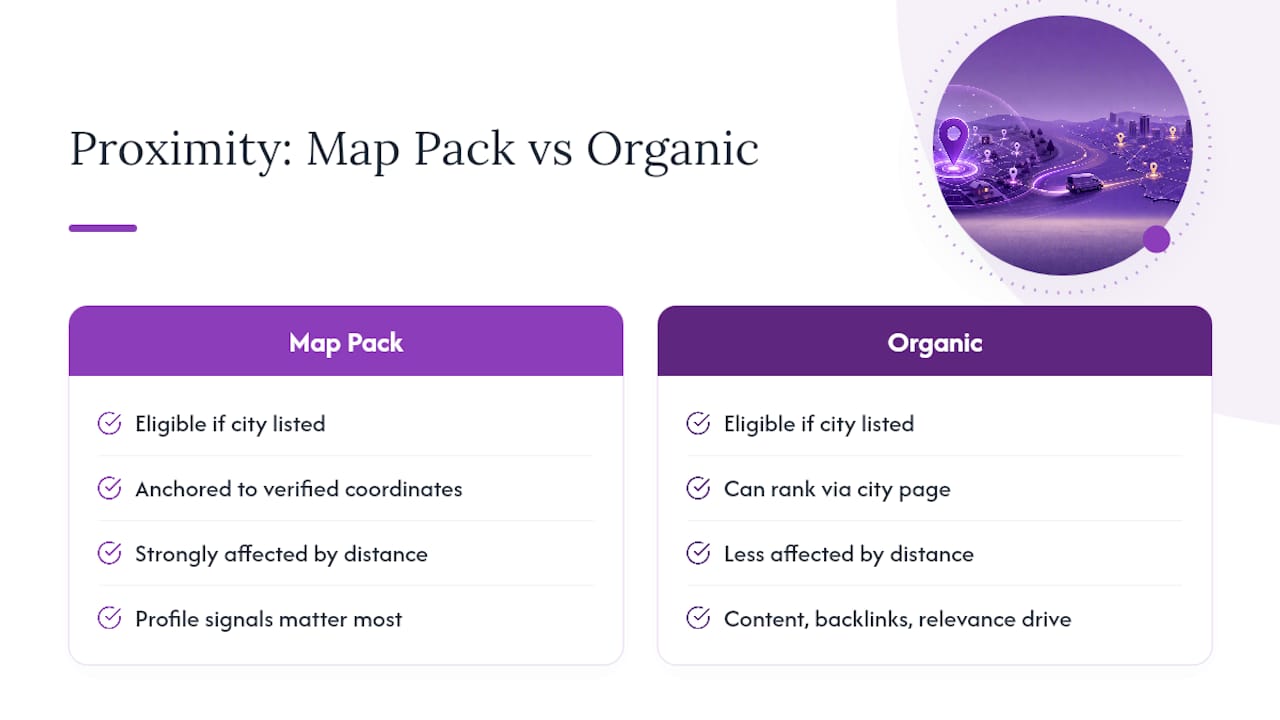
Adding a city to your Google Business Profile makes you eligible to show up there. It does not make you competitive there. Google still anchors your ranking potential to your verified business coordinates, a pattern often called the “digital leash.” The farther a searcher is from that anchor point, the harder it becomes to land in the Map Pack, even with a perfectly built profile.
This is proximity decay in practice: rankings weaken as distance from your verified address increases, regardless of how many service areas you list. A landscaping company based in one suburb can list a city some distance away and technically qualify to appear, but a competitor verified inside that city will usually beat it on Map Pack placement most of the time.
That doesn’t mean the far city is a lost cause. It means the Map Pack and organic blue-link results behave differently for you. The Map Pack leans heavily on proximity and profile signals, while organic rankings respond more to your website’s content, backlinks, and page relevance. A well-built city page can rank organically in a market where your Map Pack presence is weak, which is exactly why the next layer of strategy matters so much for businesses working beyond a tight radius.
Build city and service-area pages that actually rank
A dedicated page for each service area extends your reach past what your Google Business Profile alone can deliver, but only if it reads like a real local resource. Effective city pages include project photos taken on-site, testimonials from customers in that specific city, and details a resident would actually want, not a rewritten version of your homepage with a new city name swapped in.
Build each page around these elements:
- Local context first. Mention neighborhoods, landmarks, or service quirks specific to that city, not generic filler about “serving the greater metro area.”
- Proof of work. Include photos from jobs completed in that city and, where possible, a short case study describing the work.
- City-specific reviews. Pull testimonials that name the city or neighborhood, even if it means asking a handful of past customers directly.
- Realistic response times. State how quickly you can get a technician to that area. Vague promises read as generic; a number reads as credible.
- Structured data. Mark up each page with LocalBusiness schema, using areaServed to name the city and, where your coverage has an unusual shape, a GeoShape polygon instead of a simple radius.
Structure matters as much as content. Build a single service-area index page that links out to every city page, keep each city page at its own clean URL, and add every one to your XML sitemap. Avoid creating a page for a city where you genuinely can’t deliver the same quality of service, since that’s the classic doorway-page trap that gets whole clusters of pages devalued at once.
Pro Tip: Write one city page fully, with real photos and a real customer quote, before you template the rest. That first page becomes your quality bar, and reusing its structure (without reusing its actual content) keeps every subsequent page from turning into filler.
Collect reviews and build local signals: citations, photos, and community proof
Reviews that mention a city and a specific service carry more weight than a generic five-star rating with no context. Ask customers directly, right after the job, whether they’d mention the neighborhood and what you did. Never script the exact wording. A natural review that says “fixed our water heater in Eastvale within two hours” tells Google and future customers far more than a template ever could.
Set a review cadence you can actually sustain. A quick text or email within 24 hours of job completion, followed by one polite reminder a week later, usually beats a single ask with no follow-up.
Citations round out the proof:
- Keep your business name, address, and phone number identical across every directory listing. Inconsistent NAP data confuses both Google and customers.
- Get listed with local chambers of commerce, trade associations, and community sponsorships in the cities where you actively want visibility.
- Photograph real jobs in real neighborhoods and use them across your website, GBP posts, and social profiles instead of stock imagery.
- Earn local backlinks from community sites, local news mentions, or partnerships with complementary businesses in the same city.
Measure coverage: geo-grid rank tracking and the KPIs SABs should monitor
A single rank check from your office tells you almost nothing about how you perform across a service area that spans multiple cities. Grid-based tracking reveals neighborhood-level variation in both Map Pack and organic results, which single-point checks miss entirely.
Track these KPIs across your full coverage footprint:
- Coverage rate: the percentage of tracked grid points where you show up in the Map Pack at all.
- Pocket gaps: specific neighborhoods where visibility drops sharply even though surrounding areas look fine.
- Rank stability: how much your position fluctuates week to week versus a steady baseline.
- Review distribution by city: whether your review volume matches your service-area claims, or whether some listed cities have zero local proof.
Grid scans matter because they catch problems a single search never would. A business might rank first in its home neighborhood and disappear entirely six miles out, and you’d never know without scanning that specific point on the map. Running a scan before and after a GBP or page change also tells you whether that change actually moved the needle, rather than guessing.
For agencies managing this across dozens of clients, the operational details matter as much as the data itself. Customizable scan grids that match each client’s real service footprint, white-label reports that go out under your own brand, and support for unlimited businesses without per-location fees keep the reporting sustainable as your client roster grows.
Pro Tip: Run a grid scan immediately before and 30 days after publishing a new city page. That before-and-after comparison is the single easiest way to prove a page is working, and it’s the kind of evidence that keeps clients renewing.
How to prioritize cities and when a satellite location makes sense
Not every listed service area deserves equal attention. Score each city on five factors before committing real budget to it:
- Revenue opportunity: average job value and demand volume in that market.
- Proximity: distance from your verified address, since closer cities face less proximity decay.
- Current visibility: where you already rank, even weakly, versus starting from zero.
- Competition: how many established local competitors already dominate that Map Pack.
- Local demand signals: search volume and seasonal patterns specific to that city.
Give a focused city page and citation push six to nine months before judging results. If a city with strong revenue potential still shows a persistent visibility gap after that window despite solid content and citations, that’s usually the signal that a staffed satellite location, not another page, is what closes the distance. Once you’ve ranked your priority cities, schedule page builds one at a time, and monitor each with a grid scan rather than assuming the work is done once the page goes live.
Managing service areas across Yelp, Bing Places, and beyond
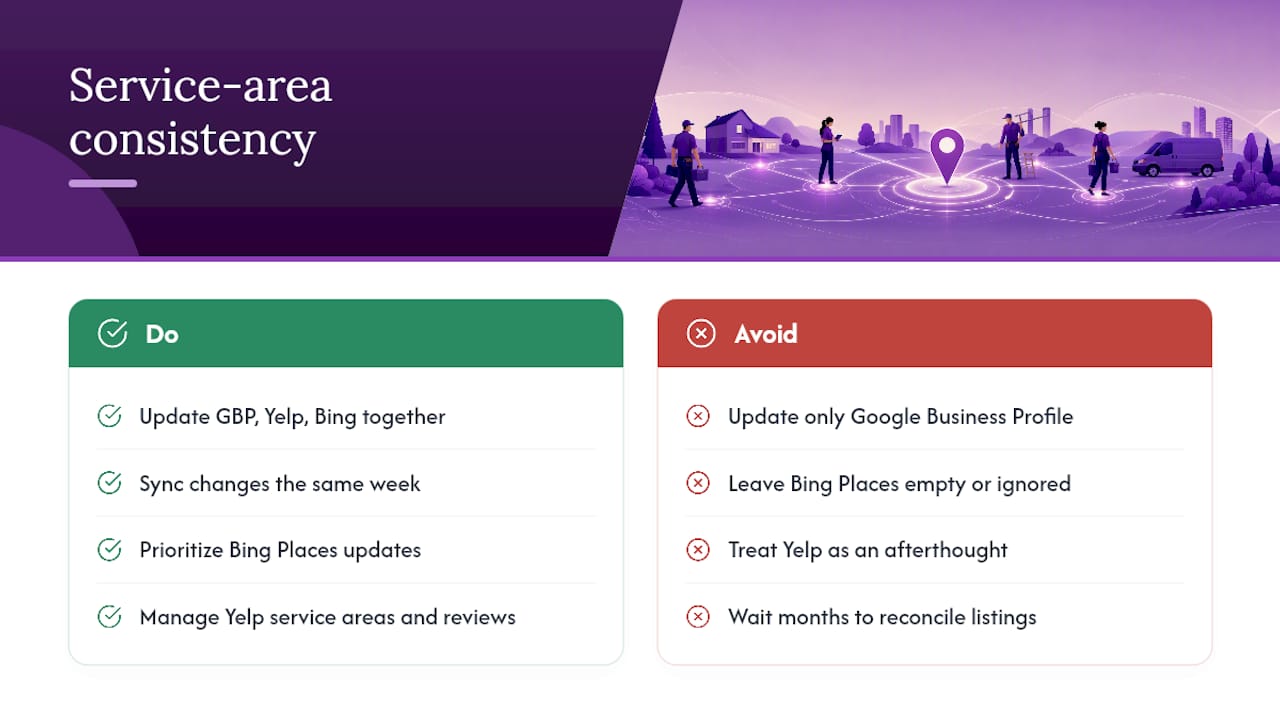
Google Business Profile isn’t the only place your service areas need to stay consistent. Yelp and Bing Places both let you define a service area separately from a physical address, and keeping those listings aligned with your GBP settings avoids the kind of contradictory NAP data that erodes trust signals across the web.
Update all three platforms whenever your coverage changes. If you drop a city from your Google Business Profile because you can no longer staff it reliably, drop it from Yelp and Bing Places the same week. Platforms that show conflicting service areas for the same business create confusion for customers and dilute the citation consistency that local search optimization depends on.
Bing Places tends to get overlooked entirely, but it still feeds local pack results in Microsoft’s ecosystem and, increasingly, into AI-generated answers that pull from Bing’s index. A five-minute profile update costs far less than the visibility you lose by ignoring it.
Yelp carries extra weight in service categories like home repair and personal care, where its review volume often rivals Google’s. Treat your Yelp service-area settings and review responses with the same care as your GBP, rather than treating it as an afterthought you update once and forget. Consistency across platforms, not perfection on any single one, is what actually protects your local search optimization efforts over time.
Mobile usability and its effect on local search visibility
More than half of all website traffic now comes from mobile devices, and service-area searches skew even more mobile than average since most of them happen when someone needs help right now. A slow-loading city page or a “click to call” button buried three scrolls down costs you leads that convert to a competitor within seconds.
Test every city page on an actual phone, not just a desktop browser resized smaller. Tap targets for your phone number and quote request form need to sit within easy thumb reach, ideally visible without scrolling on a typical screen. Page load speed matters even more for service-area searches than general browsing, since a homeowner comparing three plumbers isn’t going to wait for a page that stalls.
Google’s mobile-first indexing means the mobile version of your city pages is what gets evaluated for ranking purposes, not the desktop version. If your mobile layout hides content that’s visible on desktop (a common shortcut with collapsed accordions or truncated text), you’re effectively hiding that content from Google’s crawler too. Keep the full local context, photos, and reviews visible on mobile, just formatted to fit a smaller screen rather than stripped down.
Seasonal and temporary service areas: what changes and when
Snow removal, HVAC repair, holiday lighting, and landscaping all share a pattern: demand spikes in specific windows and disappears the rest of the year. If you expand into a temporary service area for a seasonal push, update your Google Business Profile service-area list before demand hits, not after, since Google needs time to associate your profile with that area.
Pulling a seasonal area down the moment the season ends is usually the wrong move. Instead, adjust your city page content to reflect the off-season reality (maintenance tips, next-season booking) rather than deleting the page outright. A page that vanishes and reappears every year loses whatever authority it built the previous season, while a page that stays live and simply shifts its messaging keeps accumulating value year over year.
Set a calendar reminder tied to your business’s actual seasonal pattern, not a generic quarterly schedule. A roofing company managing storm-related demand needs faster updates than a landscaping business with a predictable spring ramp-up. Whatever the cadence, treat service-area edits as a recurring operational task, not a one-time setup step you complete and forget.
Handling customer inquiries across different service areas
Customers in your closest service area expect a faster response than customers in your farthest one, and your communication should say so honestly rather than promising identical turnaround everywhere. A callback script or auto-reply that states realistic response windows by region builds more trust than a generic “we’ll get back to you soon” that turns out to mean two different things depending on where someone lives.
Route inquiries by service area whenever your team size allows it. A dispatcher or booking system that tags each request with its city lets you assign the closest available technician automatically, which shortens response time and reduces the odds of double-booking across a spread-out territory.
Train whoever answers your phone or manages your booking inbox to ask for the customer’s city early in the conversation, then confirm you actually serve that area before making any promises. Nothing damages local trust faster than confirming a job and then discovering the address falls outside your real coverage. If a request comes from just outside your listed service areas, a polite referral to a trusted partner business beats a vague “we’ll try to fit you in” that often ends in a missed appointment.
Agency perspective: balancing compliance, content, and measurement
The businesses that win at service area business SEO treat city pages as genuine local resources, not templated placeholders swapped with a find-and-replace on the city name. That distinction shows up immediately in a grid scan. A templated page might rank in the home city and go flat everywhere else, while a page built around real project photos and city-specific reviews holds its position further from the verified address.
Compliance and content quality aren’t in tension here. The businesses that follow Google’s service-area rules carefully and still invest in real local proof end up with the most durable coverage, because they’re not relying on Google’s proximity bias to do all the work for them. Measurement is what separates guesswork from an actual strategy: without a grid scan, a business has no way to know whether its city pages are working or just sitting there.
— Local
Try Maprank for geo-grid rank tracking across every service area
Maprank is the alternative to guessing whether your city pages are actually working. Instead of a single search from your office, you run a customizable grid scan across your entire service area and see exactly which neighborhoods show up in the Map Pack and which ones need work.
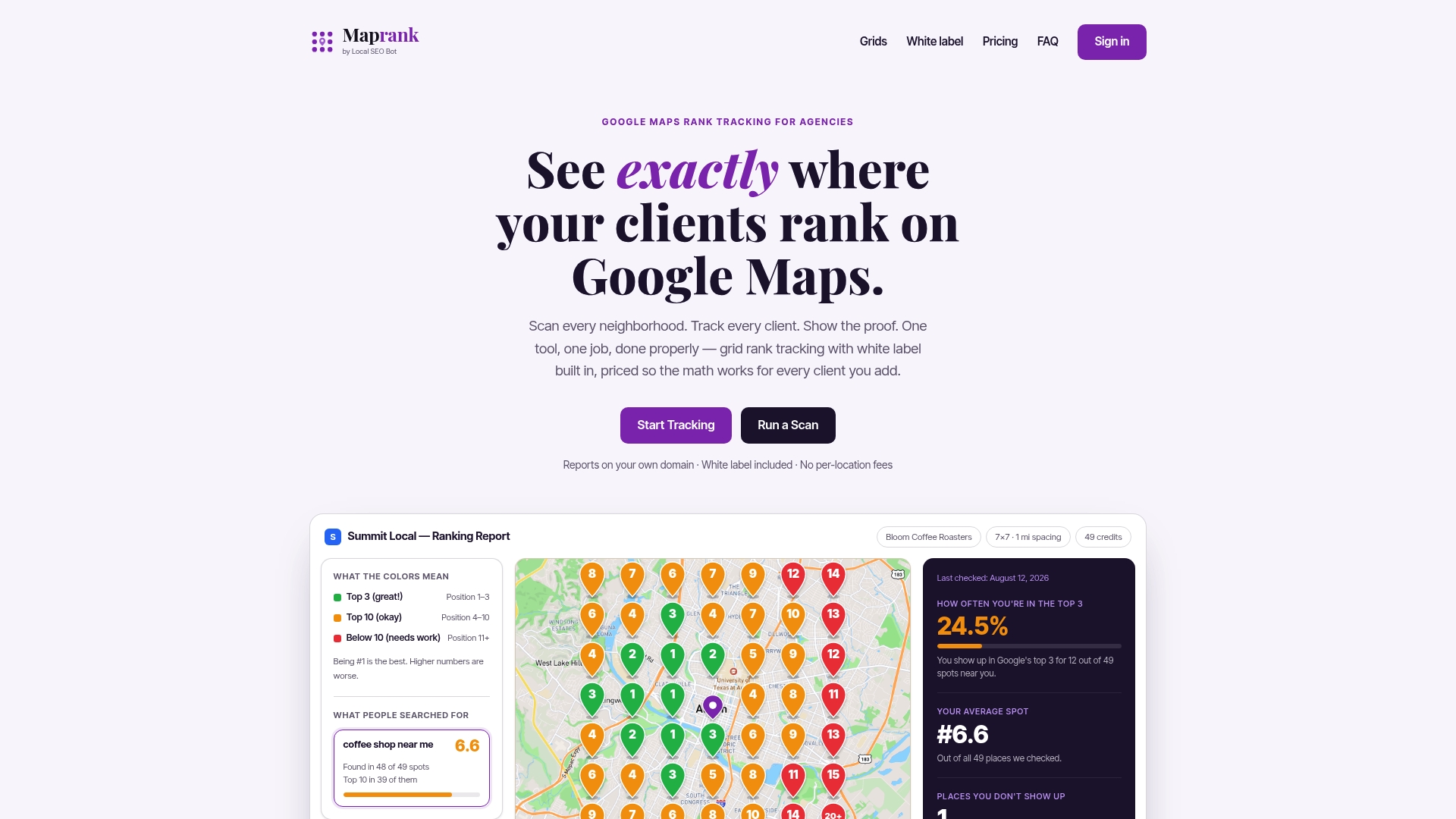
Every plan includes unlimited businesses, so agencies managing dozens of service-area clients aren’t paying per-location fees that pile up as the roster grows. White-label reports go out under your own brand, which means the coverage data and pocket gaps you find become client-facing proof rather than an internal spreadsheet nobody outside your team ever sees. Pricing stays straightforward: credits for the scans you run, not a convoluted tier structure tied to how many locations you happen to be tracking this month.
If you manage service areas for clients or your own business and want to see where coverage actually breaks down, start with the local rank tracker and run a grid scan against your current service-area list today.
Sources
- Manage your service areas for service-area & hybrid businesses - Google Business Profile Help
- Service Areas vs. Physical Location: Configuring Your GBP for Maximum Visibility - Lithium Marketing
- Service Area Business SEO: How to Rank Without a Storefront