3 Local JSON-LD Templates for GBP: Agencies & SEOs Verify 2–4 Weeks
3 Local JSON-LD Templates for GBP: Agencies & SEOs Verify 2–4 Weeks
Yes, add LocalBusiness JSON-LD to your website, and make it match your Google Business Profile exactly. GBP still runs the show for Maps and the local pack, but structured data on your site confirms those same details to Google’s crawlers. The one rule that matters more than any other field you add is that name, address, and phone number must be character-for-character identical to what’s live on GBP. Get that wrong and the schema works against you instead of for you.
TL;DR:
- Exact character-for-character consistency of name, address, and phone number between your website schema and GBP is critical; discrepancies can harm your local ranking.
- Use the most specific
@typelike Restaurant or Dentist and ensure all required fields, such as postal address in full and international telephone format, are correctly filled.- For multi-location or service-area businesses, assign each location its own schema with unique IDs and avoid copying data across pages without updating location-specific details.
- Test schema in Google’s Rich Results Test and Schema Validator, manually compare with your GBP profile, and update immediately after any GBP changes to maintain alignment.
- Track ranking changes with grid-based tools post-implementation to measure real impact, as schema correctness alone does not guarantee improved local pack presence.
Table of Contents
- What Local Schema for GBP Actually Requires
- JSON-LD Templates You Can Adapt Today
- Handling Service-Area and Multi-Location Businesses
- How Do You Test and Verify LocalBusiness Schema?
- Why GBP and Schema Have to Agree Character for Character
- Where to Place Your JSON-LD
- Fixing the Most Common Schema Errors
- The Audit-First Workflow That Actually Works
- Track What Schema Changes Actually Do to Your Rankings
- Where to Verify Your Schema and Learn More
- Sources
- FAQ
What Local Schema for GBP Actually Requires
Before you write a line of JSON-LD, pull up your live Google Business Profile and copy the exact values it displays. That’s your source of truth. Everything else in this checklist gets built around it.
Required fields — skip any of these and validators will flag your markup, and Google may ignore it entirely:
- The most specific
@typeavailable (Restaurant,DaySpa,Dentist, not the genericLocalBusiness) name, matching GBP exactly, including punctuation and suffixes like “LLC”- A complete
PostalAddressobject:streetAddress,addressLocality,addressRegion,postalCode,addressCountry telephonein international format (e.g.,+1-555-867-5309)
Recommended fields that materially help visibility and how AI systems cite your business:
geocoordinates, precise to at least 4 to 5 decimal places — anything looser can drop a pin in the wrong neighborhoodopeningHoursSpecification, using Schema rather than a plain-text stringurl,image, andpriceRangesameAs, an array of links that should include your GBP profile URL or place IDaggregateRating, but only when you have genuine review data to back it
Choosing Restaurant over generic LocalBusiness isn’t cosmetic. The Schema unlocks subtype-only properties, like servesCuisine, that plain LocalBusiness markup can’t carry. That specificity is part of why some listings pull richer detail into search results and others don’t.
JSON-LD Templates You Can Adapt Today
Three shapes cover almost every business scenario: a fixed-location shop, a service-area business with no public storefront, and a multi-location brand.
Single location (Restaurant example):
{
  "@context": "https://schema.org",
  "@type": "Restaurant",
  "@id": "https://example.com/#business",
  "name": "The Copper Kettle",
  "image": "https://example.com/images/storefront.jpg",
  "telephone": "+1-503-555-0182",
  "priceRange": "$$",
  "servesCuisine": "American",
  "address": {
    "@type": "PostalAddress",
    "streetAddress": "412 SW Alder St",
    "addressLocality": "Portland",
    "addressRegion": "OR",
    "postalCode": "97204",
    "addressCountry": "US"
  },
  "geo": {
    "@type": "GeoCoordinates",
    "latitude": 45.51987,
    "longitude": -122.67856
  },
  "url": "https://example.com",
  "sameAs": [
    "https://www.google.com/maps/place/?q=place_id:ChIJexampleID",
    "https://www.facebook.com/coppertkettlepdx"
  ],
  "openingHoursSpecification": [
    {
      "@type": "OpeningHoursSpecification",
      "dayOfWeek": ["Monday", "Tuesday", "Wednesday", "Thursday"],
      "opens": "11:00",
      "closes": "21:00"
    }
  ]
}
The table below breaks down what changes between the three patterns and why.
| Field | Single location | Service-area business (SAB) | Multi-location brand |
|---|---|---|---|
address |
Full PostalAddress, always shown |
Often omitted if no public storefront | Full address, unique per location page |
areaServed |
Not typically needed | Required, uses GeoCircle or city names |
Optional, per-location if relevant |
@id |
One canonical ID for the business | One canonical ID per SAB entity | Unique @id per location page |
parentOrganization |
Not applicable | Not applicable | Links each location to the brand entity |
telephone |
One main line | Local or tracking number | Unique per location, never shared |
For an SAB, drop the street address if you don’t serve walk-in clients and instead declare where you work:
"areaServed": {
  "@type": "GeoCircle",
  "geoMidpoint": {
    "@type": "GeoCoordinates",
    "latitude": 45.5152,
    "longitude": -122.6784
  },
  "geoRadius": "40000"
}
For multi-location chains, each location page carries its own LocalBusiness block with a unique @id, plus a parentOrganization reference pointing back to the brand’s main Organization schema. Don’t let one template serve every location. A shared block with swapped-out city names is exactly how NAP mismatches sneak in.
Handling Service-Area and Multi-Location Businesses
A plumber who drives to customers shouldn’t publish a street address in schema if GBP doesn’t display one either. Consistency cuts both ways: if your GBP profile hides the address because you’re a service-area business, your schema needs to hide it too.

Use areaServed to define your coverage instead. A GeoCircle works well for a radius around a central point; a GeoShape or a list of city names works better when your territory follows county lines or an irregular service boundary rather than a clean radius.
Multi-location businesses face a different problem: duplication and drift. A few practices keep it clean:
- Give every location its own dedicated page, never a shared page with a dropdown selector
- Assign each location a unique
@id,telephone, and address block - Link every location back to the parent brand using
parentOrganization - Never reuse one location’s phone number as a placeholder for another, even temporarily
The pattern that causes the most damage is copy-pasting one location’s JSON-LD to spin up ten more without updating every field. Centralize schema generation through one template or plugin so a bulk edit doesn’t leave three locations with the wrong city name.
How Do You Test and Verify LocalBusiness Schema?
Publishing schema without testing it is a coin flip. Run these checks in order, every time you make a change:
- Paste the JSON-LD into Google’s Rich Results Test. It flags syntax errors and tells you which properties Google recognizes for rich result eligibility, though it won’t catch a mismatch against your GBP listing.
- Run the same code through the Schema.org Markup Validator. This checks strict compliance with the schema.org vocabulary, catching typos in property names that the Rich Results Test sometimes lets slide.
- Manually audit your live GBP profile. Open it side by side with your JSON-LD and compare name, address, phone, and category field by field. No automated tool does this for you.
- Deploy to staging first, then production. Re-run both validators after the code goes live, not just in staging, since CMS rendering sometimes strips or reorders attributes.
- Monitor indexation and local-pack position for two to four weeks after publishing. Rich results can take time to appear even when the markup validates cleanly.
Pro Tip: Keep a simple spreadsheet log of your GBP’s exact name, address, phone, category, and place ID before you touch any schema. When something breaks three months from now, you’ll have a dated record of what “correct” looked like, instead of guessing.
Neither validator checks whether your schema matches your GBP listing. That gap is exactly where most local-pack ranking problems originate, and it’s on you to catch it manually.
Why GBP and Schema Have to Agree Character for Character
Google Business Profile runs the Maps experience and largely determines local-pack placement. LocalBusiness schema on your site plays a supporting role: it confirms the same facts to Google’s algorithms and to AI systems pulling business details for answers. Neither one replaces the other, and Google treats them as complementary signals, not competing ones.
The trouble starts when they disagree. A GBP listing showing “123 Main St.” next to a website schema block showing “123 Main Street” looks like a small thing. It isn’t. Practitioners tracking local-pack fluctuations consistently point to these tiny mismatches as a common trigger for ranking suppression, because Google’s algorithms can no longer confirm with confidence that both records describe the same business.
Common failure points worth auditing right now:
- Abbreviation drift: “St.” vs “Street,” “Ave” vs “Avenue,” suite numbers included on one and dropped on the other
- Missing legal suffixes like “LLC” or “Inc.” on one listing but not the other
- Stale schema left live after a GBP address or phone number change
- Wrong
addressCountrycodes, especially on international sites using a two-letter code inconsistently - Duplicate schema blocks output by a plugin and a theme simultaneously, each with slightly different values
Treat GBP as the master record. When it changes, your schema update should happen the same day, not whenever someone remembers.
Where to Place Your JSON-LD
For a single-location business, put the LocalBusiness block on your homepage. For a multi-location brand, each location needs its own dedicated page carrying its own block, with a shared Organization schema tying them together through @id references.
A few implementation details separate a clean rollout from a messy one:
- Use a consistent
@idfor each business entity so other schema types (reviews, breadcrumbs, articles) can reference it without duplication - On WordPress, pick one plugin or theme function to generate LocalBusiness schema and disable any redundant SEO plugin schema output. Duplicate, conflicting blocks from two sources are a frequent, avoidable cause of validation errors.
- On Shopify or Squarespace, schema usually needs a custom code injection in theme settings since native support is limited. Test after every theme update, since updates sometimes wipe custom code.
- Always test on staging before pushing to production, and keep one canonical URL per location so search engines don’t index duplicate or parameterized versions of the same page.
Fixing the Most Common Schema Errors
Most schema problems fall into four buckets: broken syntax, mismatched NAP data, missing required fields, and imprecise geo coordinates. A geo coordinate rounded to two decimal places, for instance, can be off by several hundred meters, enough to place a business in the wrong neighborhood entirely.
When something breaks, work through it in this order:
- Re-check syntax first. A missing comma or bracket invalidates the entire block, not just one property.
- Compare every NAP field against your live GBP listing, not against an old spreadsheet or a previous website version.
- Confirm all required fields are present:
@type,name,address,telephone. - Bump geo coordinates to at least four decimal places if they’re currently rounded.
- Clear caching layers (CDN, plugin cache) after fixing anything, then re-run both validators.
- Bring in a developer when the fix requires touching template logic or a CMS’s schema-generation code directly, rather than a simple text edit.
Google rarely needs to be contacted directly for schema issues. Fix the markup, revalidate, and let normal crawling pick up the change.
The Audit-First Workflow That Actually Works
Skip the schema generator and start with a GBP audit: name, address, phone, category, and place ID, frozen as your reference values before anyone touches code. Assign clear roles: an SEO lead owns the audit and validation, a developer implements and maintains the templates, and a client reviewer signs off before publishing. Track indexation, local-pack movement, and citation consistency for a few weeks after launch. Skipping the audit step is the single most common reason schema rollouts underperform.
— Local
Track What Schema Changes Actually Do to Your Rankings
Once your LocalBusiness schema matches your GBP profile, the next question is whether it moved anything. A validator will confirm your markup is technically correct, but it can’t tell you if you climbed the local pack in the neighborhoods your clients actually care about. That’s a measurement problem, not a schema problem, and it needs a different tool.
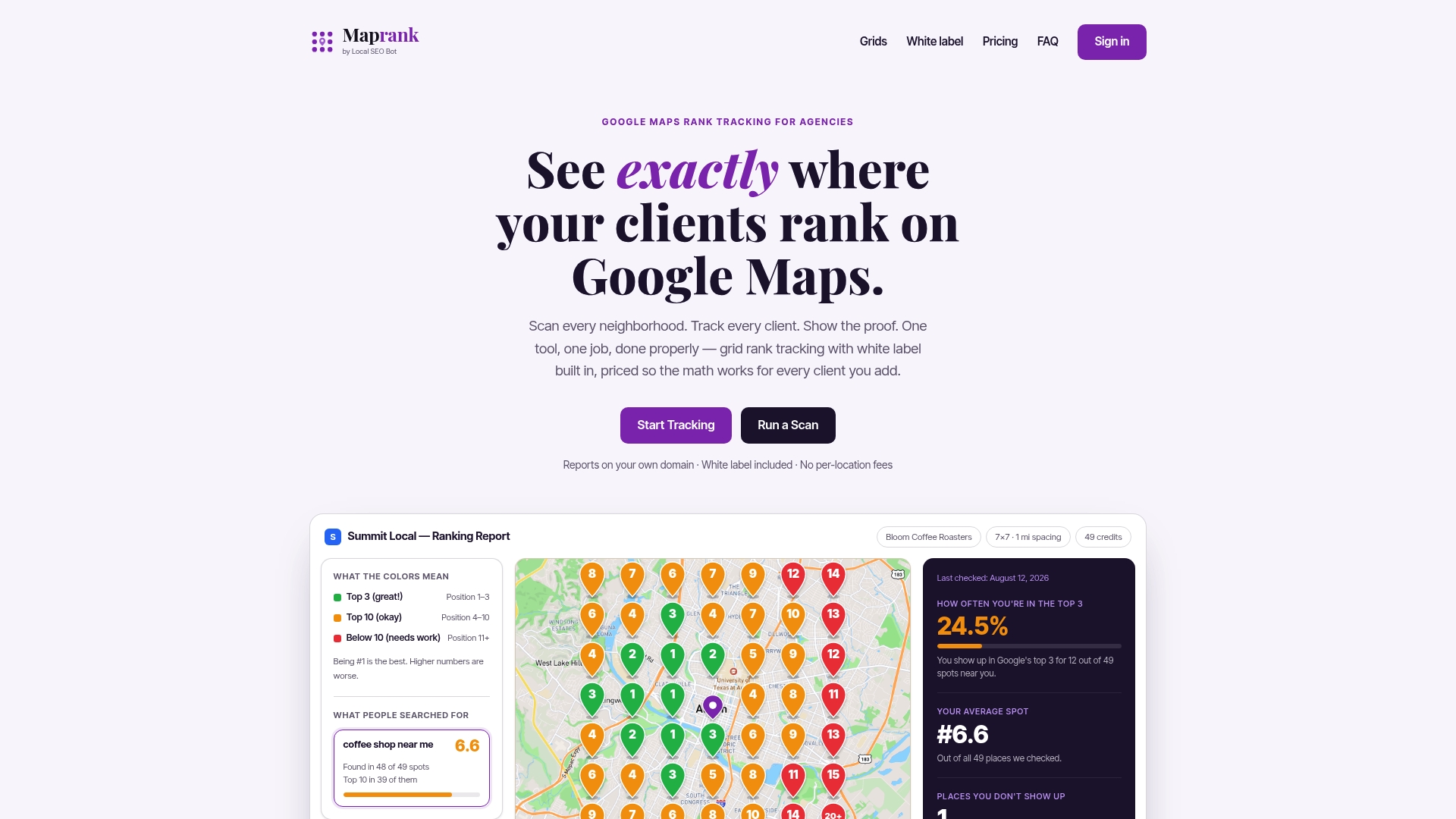
Maprank runs grid-based scans across a custom map of a business’s service area, so you can see ranking position block by block instead of guessing from one search result. Run a scan before you deploy schema changes, then run the same grid again two to three weeks later. The difference shows you exactly which neighborhoods gained map pack coverage and which ones still need work. The tool includes unlimited businesses and white-label reporting, so agencies can hand clients a branded before-and-after without extra per-location fees. If you’re managing schema rollouts for multiple clients, start with a pre-change grid scan to establish your baseline before you publish anything.
Where to Verify Your Schema and Learn More
Google’s own Local Business structured data documentation lists every supported property and formatting rule. The Schema defines the full list of subtypes worth choosing from instead of the generic type. Run finished markup through the Rich Results Test and the Schema Markup Validator before anything goes live.
Sources
- Local Business (LocalBusiness) structured data | Google Search Central
- Schema
- LocalBusiness Schema: Complete Implementation Guide - Deep in SEO & GEO
FAQ
What Is GBP in Local SEO?
GBP stands for Google Business Profile, the free listing that controls how a business appears on Google Maps and in the local search results pack. It’s the primary signal Google uses for local ranking, and LocalBusiness schema on your website works alongside it rather than replacing it.
What Is Local Schema, Exactly?
Local schema, more precisely called LocalBusiness schema, is structured data in JSON-LD format that tells search engines your business name, address, phone number, hours, and other identifying details in a standardized way. It’s built on the schema.org LocalBusiness vocabulary, and choosing the most specific available subtype gives you access to extra properties a generic listing can’t use.
Can You Give an Example of LocalBusiness Schema?
A basic example includes @type: "Restaurant" (or another specific subtype), name, a full PostalAddress object, telephone, and geo coordinates, all wrapped in JSON-LD syntax. The full annotated template earlier in this guide shows every required and recommended field working together in one block.
Is FAQ Schema Still Relevant?
Yes, FAQ schema remains valid, but only when it marks up genuine, visible questions and answers already on the page. Google has warned against using it for content that isn’t actually displayed to visitors, so staged or stuffed FAQ blocks risk doing more harm than good. Tools like Konvuno can help structure real FAQ content in a way that’s both reader-friendly and schema-ready.
How Often Should Schema Be Updated After a GBP Change?
Update your schema the same day you change anything on GBP, whether that’s a phone number, hours, or address. Practitioners consistently flag delayed updates as a source of the character-for-character mismatches that quietly suppress local-pack visibility.