Geo Grid Evidence Stops Local Search Spam in 2–6 Weeks for Agencies
Geo Grid Evidence Stops Local Search Spam in 2–6 Weeks for Agencies
Local search spam is any fake listing, manipulated business profile, or fraudulent review designed to mislead searchers or divert leads away from a legitimate business. The first move when you find it is not outrage. It’s documentation: screenshot the listing, capture Street View, log it in a tracking sheet, then file a report. Removal typically takes weeks, and cases with thorough evidence get resolved faster than one-off complaints.
TL;DR:
- Fake listings often appear at virtual addresses or with duplicate profiles, making regular geo-grid scans essential to identify suspicious patterns early.
- Searchers can be misled by manipulated profiles occupying top map pack positions, which can be removed within two to six weeks with proper evidence.
- Consistently comparing business details against real-world signage and public records helps detect impersonated or fake listings before they impact leads.
- Building a structured evidence tracker before encountering spam listings streamlines reporting and increases chances of faster removal.
- Using dedicated tools like geo-grid rank trackers and white-label reporting platforms enhances ongoing detection and helps agencies present strong redressal cases.
Table of Contents
- What Counts as Local Search Spam?
- Why Local Search Spam Actually Costs You Leads
- How to Detect Spam in Your Market
- How to Report and Remove Spam Listings
- Preventive Practices and Profile Hygiene
- Monitoring Tools and Routines Worth Building Into Your Month
- How Agencies Package Evidence for Faster Removals
- Real Cases Show What Detection and Removal Actually Look Like
- Google’s Actual Policy on Local Search Spam
- Tools for Automated Detection and Ongoing Management
- Make Spam Monitoring Routine, Not Reactive
- Maprank: Purpose-Built for Geo-Grid Monitoring and White-Label Reporting
- Where to Go for Official Guidance and Deeper Data
- Sources
- FAQ
What Counts as Local Search Spam?
Local search spam takes several recognizable shapes on Google Maps, and most business owners run into more than one type before they realize what’s happening.
- Fake or impersonated listings. Someone creates a Google Business Profile using a name, address, or phone number that mimics a real business, then intercepts calls and leads.
- Keyword-stuffed business names. A plumbing company renames itself “Best 24/7 Emergency Plumber Phoenix AZ” to game rankings, which directly violates Google’s naming guidelines.
- Duplicate listings and virtual addresses. The same business (or a fake one) appears multiple times, often tied to a UPS box or coworking space rather than a real office.
- Fake reviews. Paid five-star reviews inflate rankings, while review bombing or suppression tactics bury legitimate feedback.
- Phone-number reuse. Lead-generation operations swap in tracking numbers that reroute calls to a different company entirely, sometimes at a markup.
Each of these categories violates a specific piece of Google’s spam policy, not just a vague sense of unfairness.
Why Local Search Spam Actually Costs You Leads
A fake listing sitting in the map pack isn’t a cosmetic annoyance. It occupies one of the three visible slots searchers see before they ever click “more places,” and every spam profile in that top tier is a legitimate competitor’s lost call.
Google has acknowledged the scale of the problem directly. In 2025, the company removed more than 13 million fake business profiles and blocked over 292 million policy-violating reviews on Maps, along with 79 million inaccurate or unverified edits. Fake review removals alone rose 21% year over year, and blocking 79 million bad edits works out to more than 200,000 attempted manipulations every single day.
By the Numbers: Google blocked over 292 million policy-violating reviews and removed 13 million fake profiles in 2025, a 21% increase in review removals compared to the prior year.
That volume tells you spam isn’t a fringe issue confined to a few sketchy categories. It’s a daily arms race, and local service businesses (locksmiths, HVAC, garage door repair) tend to see it worst because the leads are worth the most to scammers. Practitioner audits back this up at the ground level: reviews of Phoenix-area listings found 15% to 22% of top-10 Maps results carried at least one spam signal. Remove just one or two fake competitors sitting above you, and a legitimate business can jump into the top three almost overnight.
How to Detect Spam in Your Market
Catching spam early means running the same checks every month, not scrambling after a client notices a competitor stealing calls. Here’s a repeatable process.
- Run geo-grid scans on your priority keywords. Export the top 10 listings per grid cell so you can see exactly who ranks where across your service area, not just at your office address.
- Compare business names against real-world signage. Check the physical storefront, the company’s own website, and state business registries. A mismatch between “Joe’s Plumbing” on the sign and “Joe’s #1 Plumbing Repair Phoenix” on Maps is a red flag.
- Verify addresses through Street View and public records. Virtual offices, UPS boxes, and empty lots show up fast once you actually look at the street-level image.
- Watch for phone-number reuse and review anomalies. A sudden cluster of five-star reviews posted within days of each other, or an owner response that reads like a scripted apology, both suggest manipulation.
- Log everything in a structured tracker. At minimum, record the date found, target keyword, ranking position, violation type, evidence links or screenshots, whether a form was submitted, and the resulting ticket ID.
Pro Tip: Build your tracking sheet before you find your first spam listing, not after. A blank template with those seven columns takes ten minutes to set up and saves hours of scrambling when you’re assembling a redressal packet under deadline pressure.
Run this audit monthly, not quarterly. Spam listings can appear and start stealing calls within days, and a three-month gap between checks means three months of lost leads you can’t fully recover. Keep the spreadsheet running continuously so you always have a “before” state to compare against once a listing gets pulled.
How to Report and Remove Spam Listings
Google gives you two main paths, and picking the wrong one wastes time. “Suggest an edit” works for minor factual errors on a listing you don’t own, like a wrong phone number. For actual spam, fake profiles, or policy violations, you need the Business Redressal Form.
Before you file anything, assemble your evidence packet:
- Screenshots of the offending listing showing the fake name, address, or phone number
- Street View captures proving the address doesn’t correspond to a real business
- Business registry lookups showing no legitimate entity at that address
- Side-by-side comparisons showing phone or address mismatches against the real business
Submit reports that document a pattern across multiple listings rather than a single isolated complaint. Redressal cases that show coordinated manipulation across several listings tend to move faster and succeed more often than one-off reports, because reviewers can see the scale of the problem rather than guessing at intent.
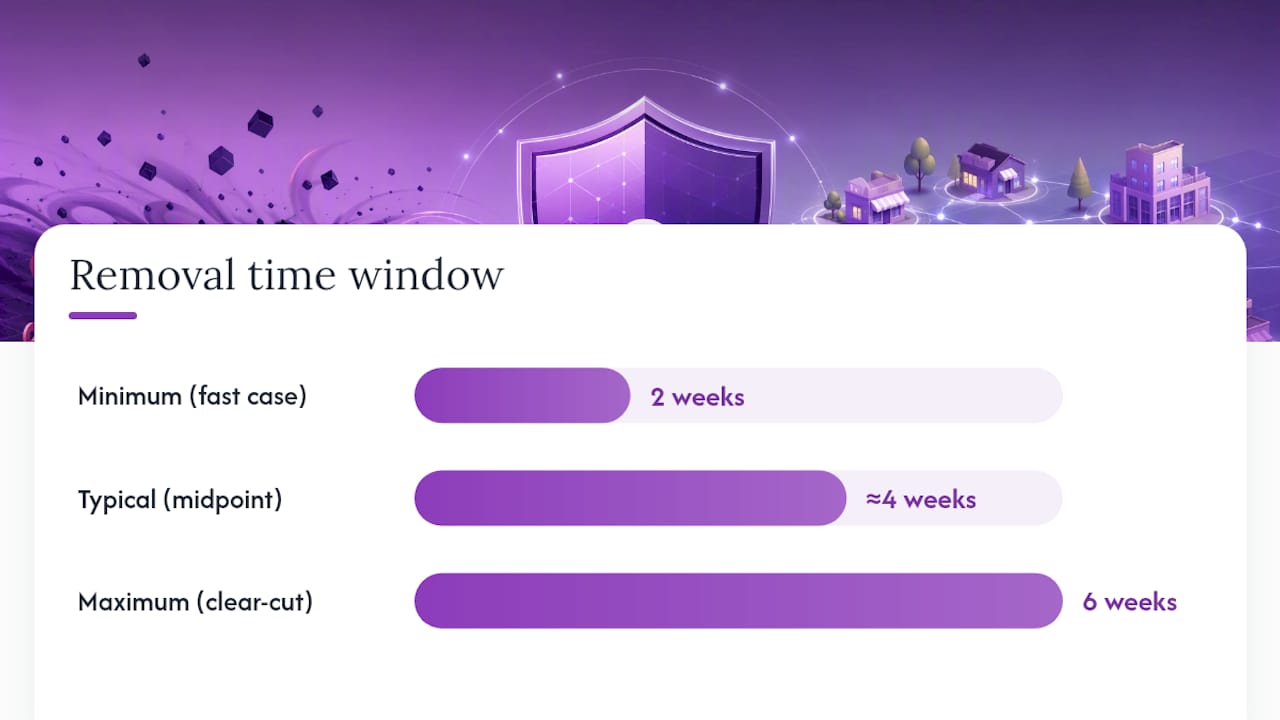
Expect a two-to-six week window for clear-cut cases with strong evidence. If nothing happens after six weeks, refile with additional documentation rather than resubmitting the same packet. When a listing does get suspended, don’t assume the fight is over. Some come back under a slightly altered name within weeks.
Measure your actual success with grid scans taken before and after the removal. A before/after comparison showing your business moving from position 7 to position 2 across a dozen grid points is far more persuasive (and useful for client reporting) than simply noting “listing removed.”
Preventive Practices and Profile Hygiene
The businesses that spend the least time fighting spam are usually the ones with the cleanest profiles to begin with. Google’s policy enforcement increasingly punishes gray-area tactics that used to slide by unnoticed.
- Match your GBP name to your legal and signage name exactly. No city names, service keywords, or taglines appended. Enforcement in 2026 specifically targeted keyword-stuffed names, and waiting for a warning before fixing it is a losing bet.
- Consolidate thin city pages. If your “Plumbing in Mesa” and “Plumbing in Chandler” pages are identical except for the city name, Google’s spam policy names that exact pattern as doorway content. Run the swap test: if swapping the city name breaks nothing else on the page, it’s thin.
- Follow FTC review rules. Never offer incentives for reviews without disclosure, and never suppress or hide negative feedback. Both practices violate consumer protection guidance, not just Google’s terms.
- Keep operational details accurate. Use a unique phone number for each real location, avoid shared mailboxes across listings, and update hours the moment they change.
- Add real local proof to every page. Named project photos, neighborhood-specific details, and your actual service process do more for both rankings and spam-resistance than another paragraph of generic copy.
Pro Tip: If you outsource review responses, audit them quarterly. Google’s owner-response reporting now lets users flag replies as off-topic, containing personal information, or otherwise inappropriate, and a templated response written by an overseas contractor can trigger exactly that kind of flag. A review reply management tool can help keep responses consistent and policy-compliant across every profile.
Monitoring Tools and Routines Worth Building Into Your Month
Detection is only useful if it happens on a schedule. Waiting until a client complains about lost calls means you’re already behind.
Build a monthly review around four outputs: fresh geo-grid rank results for your priority terms, any newly created listings that showed up in your service area, review pattern anomalies (sudden spikes, near-identical wording, unverified reviewers), and flagged owner responses that might violate content policies.
- Pull a fresh grid scan and compare it against last month’s baseline.
- Scan the top 10 results per grid cell for new or suspicious listings.
- Cross-check any flagged listing’s address and phone number against public records.
- Review recent reviews for pattern anomalies (timing clusters, generic language, unverified accounts).
- File redressal reports for anything confirmed, and note the ticket ID in your tracker.
For tooling, think in three categories: geo-grid rank trackers that show neighborhood-level visibility (not just a single citywide average), listing audit tools that flag NAP inconsistencies, and phone-number intelligence services that catch call-forwarding scams. A dedicated geo-grid rank checker gives you the before/after evidence that makes a redressal case, or a client report, far more convincing than a single ranking snapshot.
How Agencies Package Evidence for Faster Removals
Agencies managing dozens of client profiles need a workflow that scales, not a folder of random screenshots. Geo-grid scans matter here specifically because they show where a fake listing is stealing visibility, not just whether it outranks you on one search.
A grid scan across 49 or 100 points in a service area reveals exactly which neighborhoods a spam listing dominates, which is the kind of granular evidence a single search result never shows.
- Chronological grid screenshots documenting a spam listing’s rise and your own ranking drop over time
- Street View captures and business registry records packaged alongside the ranking data
- White-label reports that let agencies present this evidence under their own branding rather than a generic tool’s logo
- Unlimited businesses tracked per plan, so an agency isn’t rationing scans across clients based on account tier
Geo-grid evidence carries particular weight in redressal cases because it demonstrates lead loss across an entire service area rather than a single keyword, which is exactly the kind of pattern Google’s reviewers respond to fastest.
Real Cases Show What Detection and Removal Actually Look Like
The clearest evidence that this problem is systemic, not anecdotal, comes from Google’s own legal action. In 2025, Google sued a network of scammers responsible for thousands of fake Maps listings, uncovering and eliminating a coordinated operation that had been intercepting calls meant for real businesses and, in some documented cases, charging customers inflated prices once the call was rerouted.
That case matters because it shows the fake-listing problem isn’t limited to a handful of opportunistic individuals. It’s organized, repeatable, and profitable enough to run at scale across multiple markets and business categories simultaneously.
On the practitioner side, the Phoenix-area audits mentioned earlier found spam concentrated heavily in home-service categories: plumbing, HVAC, garage doors, locksmiths. In several documented instances, removing just one or two fake competitors from the top 10 was enough to move a legitimate, long-established business into the map pack’s top three positions. The pattern holds across most metro markets with high-value service categories: spam concentrates where the cost-per-lead is highest, because that’s where diverting a call pays off the most for whoever is running the fake listing.
The lesson from both cases is the same. Spam isn’t randomly distributed. It clusters around your most valuable keywords and your most profitable service lines, which means your monitoring effort should concentrate there too, rather than being spread evenly across every listing you manage.
Google’s Actual Policy on Local Search Spam
Google’s spam policies for Maps are more specific than most business owners assume, and enforcement has tightened noticeably heading into 2026.
The core rules prohibit misrepresenting your business name (no keyword stuffing, no unauthorized taglines), maintaining an ineligible business (no listings for locations that don’t have a permanent, staffed presence), and creating fake reviews or manipulating review counts through incentives or bulk posting. Google’s guidance also explicitly warns businesses about scammers impersonating Google representatives, who demand payment for listing services that are actually free and often push urgency tactics like threatening to delete a profile unless the business pays immediately or provides personal information.
The June 2026 spam update sharpened enforcement specifically around scaled and duplicated local content: near-identical city pages, doorway pages built purely to rank for geographic modifiers, and thin location matrices with no unique local proof. AI Overviews have raised the verification bar further, since automated systems now cross-check content originality more aggressively before surfacing a page as a trustworthy local result.
For business owners, the practical takeaway is that Google’s enforcement has moved from reactive (responding to individual complaints) toward proactive (algorithmically flagging patterns at scale). That shift cuts both ways. It means legitimate spam gets caught faster, but it also means a business with a sloppy content structure, even without any malicious intent, might get swept up in the same enforcement wave.
Tools for Automated Detection and Ongoing Management
Manually checking every listing every month doesn’t scale past a handful of locations, which is why most serious local SEO operations lean on a small stack of specialized tools rather than one all-in-one platform.
Geo-grid rank trackers form the backbone of any detection routine, since they reveal ranking manipulation at the neighborhood level that a single search query would never expose. Listing audit tools catch NAP (name, address, phone) inconsistencies across directories, flagging duplicate or conflicting business information before it compounds into a bigger problem. Phone-number intelligence services identify when a tracking number reroutes calls somewhere other than the business it claims to represent, which is often the first hard evidence in a call-interception case.

Review management platforms round out the stack, monitoring for suspicious review patterns like timing clusters or templated language, and helping standardize owner responses so they don’t accidentally trip Google’s content-policy flags on off-topic or inappropriate replies. Comparing platforms across these categories is worth doing before committing to a subscription, since pricing and feature sets vary considerably between geo-grid tracking tools.
The right combination depends on how many locations you’re managing. A single-location business might get by with a monthly manual grid scan and a spreadsheet. An agency managing forty client profiles across a dozen metro areas needs automated alerts, white-label reporting, and a tracker that doesn’t charge extra every time it adds a new client account.
Make Spam Monitoring Routine, Not Reactive
Most businesses treat spam-fighting like a fire drill: something that happens once, in a panic, after a competitor’s fake listing has already been stealing calls for months. That delay is the real cost. Every week you wait to document and report is a week of lost leads you can’t recover after the fact, and Google’s reviewers respond better to patterns than to isolated, late complaints. Treat your monthly grid scan the same way you treat a bookkeeping check: small, boring, and non-negotiable. The documentation you build along the way isn’t paperwork. It’s your evidence file the day you need to prove a pattern.
— Local
Maprank: Purpose-Built for Geo-Grid Monitoring and White-Label Reporting
Maprank was built for exactly the workflow this article describes: running consistent geo-grid scans, catching spam listings before they cost you leads, and packaging the evidence in a report your client actually understands.
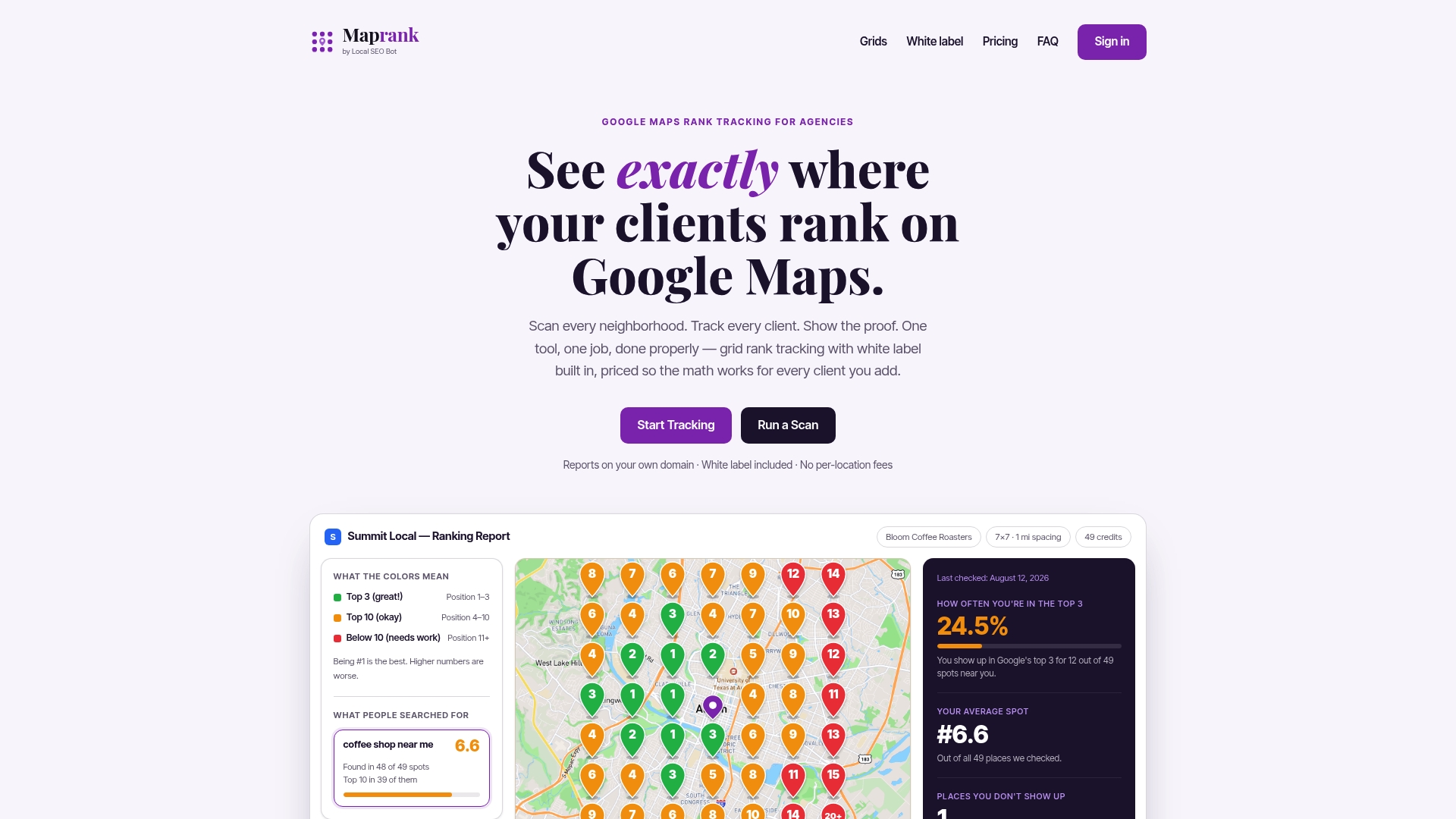
Instead of juggling per-location fees or wrestling with Google account integrations, agencies get customizable scan grids, unlimited businesses on every plan, and white-label reports that go out under their own branding. That last point matters more than it sounds. When you’re building a redressal case or showing a client their before/after ranking improvement, a report with your agency’s logo on it (not a third-party tool’s) is what keeps that client renewing next quarter. Plans start with Maprank Solo at $19 per month for individual accounts, scaling up through Maprank Agency at $39 per month for teams managing multiple clients. If you want to test the concept on a single problem listing first, the one-off rank check lets you run a grid scan without committing to a subscription. Either way, the next step is the same: pull a scan, see exactly where spam is costing you map-pack visibility, and start building your evidence file today.
Where to Go for Official Guidance and Deeper Data
- File spam and impersonation reports through Google’s Business Redressal Form, and review its scammer-behavior warnings before responding to any unsolicited contact claiming to represent Google.
- Read Google’s own account of enforcement scale in its Maps protection update, which details the 2025 removal numbers cited throughout this piece.
- For vertical-specific spam concentration data and redressal-filing strategy, Chris Brannan’s audit writeup walks through real Phoenix-market findings.
- For 2026 enforcement trends around duplicated local content, see the June 2026 spam update analysis.
Sources
- Report fraud and scams (Google Maps Help)
- How to Fight Google Business Profile Spam (Chris Brannan)
- June 2026 Spam Update: A Local Content Audit (Emarketed)
FAQ
What Is Local Search Spam?
Local search spam refers to fake listings, manipulated business profiles, or fraudulent reviews on platforms like Google Maps designed to mislead searchers or steal leads from legitimate businesses. Common forms include keyword-stuffed names, duplicate listings at virtual addresses, and paid or fabricated reviews.
What Is Google Local Search?
Google local search is the system that surfaces nearby businesses in Google Maps and the map pack when someone searches for a service or product near their location. It ranks results using factors like proximity, relevance, and profile completeness, which is exactly what spam listings try to game.
Why Am I Getting So Many Spam Calls From Local Numbers?
Spam calls using local numbers often come from lead-generation operations or scammers spoofing area codes to appear trustworthy, sometimes tied to fake Maps listings that reroute your customers’ calls. If you notice your own business number being reused or spoofed elsewhere, that’s a sign of the phone-number reuse tactic covered in the detection checklist above.
What Are Local Search Ads?
Local search ads are paid placements that appear above organic map pack results when someone searches for a nearby business or service. They’re a legitimate advertising product from Google, separate from spam, though spam listings sometimes appear alongside them in ways that confuse searchers about which results are trustworthy.
How Long Does It Take to Get a Spam Listing Removed?
Well-documented cases with clear evidence (screenshots, Street View, registry records) typically resolve within two to six weeks. Reports that show a pattern across multiple listings, rather than a single isolated complaint, tend to move faster because they’re easier for reviewers to verify.
Can Maprank Help Me Detect Local Search Spam?
Maprank’s geo-grid scans show exactly which listings are occupying map-pack positions across a service area, making it easier to spot fake or duplicate competitors stealing visibility. Agencies use the white-label reports to document ranking changes before and after filing a redressal report.