GBP Photo Rankings for Agencies: Test Impact with Grid Scans
GBP Photo Rankings for Agencies: Test Impact with Grid Scans

Photos improve engagement and can indirectly support your Google Business Profile visibility, but geotagging has no reliable proof of directly boosting rank. Treat photos as conversion assets: they help customers decide, and that behavior may feed local signals over time. Your next step is simple: upload real, well-shot images that follow Google’s published photo guidance.
TL;DR:
- Use JPG or PNG files from 10 KB to 5 MB; Google recommends 720 x 720 pixels and sets a minimum resolution of 250 x 250 pixels.
- If budget is tight, prioritize exterior, at work, and product photos that show customers your location, staff, and offerings before they visit.
- Uploads may take 24 to 48 hours to appear after review, and customer photos can sometimes replace your chosen cover or logo.
- Avoid edited coordinates and keyword stuffed EXIF metadata; location tags should match the real site, and captions should describe each image factually.
- Compare photo views with calls and direction requests, and run neighborhood grid rank checks before a refresh and again a few weeks later.
Table of Contents
- What Google officially says about Business Profile photos
- Do photos affect rankings directly, or only through engagement?
- Which photo types should you add, and how many?
- How do you prepare and upload photos correctly?
- Should you use geotags and EXIF data on GBP photos?
- What is a simple photo checklist and monthly routine?
- Treat photos as conversion assets, not SEO hacks
- How can you measure whether photo updates change visibility?
- FAQ
- Sources
What Google officially says about Business Profile photos
Google’s Business Profile help lists the photo categories you can fill: logo, cover, exterior, interior, product, at work, team, and 360. It gives recommended minimums for exterior, interior, product, and at-work shots.
The file rules are specific. Use JPG or PNG, between 10 KB and 5 MB, with a recommended resolution of 720 x 720 and a minimum of 250 x 250. Photos appear only after your profile is verified and the images pass review.

Google also separates what you upload from what customers upload. Owner photos and user photos display differently on your profile, and a customer’s photo can sometimes surface more prominently than you expect. A blurry or mislabeled image may be less useful to customers. Plan your photo set knowing both people and algorithms will read it.
Do photos affect rankings directly, or only through engagement?
Be careful here: geotagging has no consistent evidence of directly improving GBP rankings. What the evidence supports is an engagement effect. Moz reports that businesses with photos are more likely to receive driving-direction requests and website clicks.
That points to a plausible chain. Better photos earn more clicks and direction requests, and stronger engagement may support your local signals over time. It is a hypothesis you can test, not a guarantee.
Practitioner guidance on geotagging is cautious. Zoho’s local guide recommends focusing on accurate, relevant images rather than treating metadata as a ranking tactic.
So separate the two categories. Direct ranking factors are unproven for photos and geotags. Indirect signals, such as clicks, calls, and directions, are things photos can plausibly influence. Invest where the evidence points.

Which photo types should you add, and how many?
Google lists photo categories including exterior, interior, product, at work, team, logo, cover, and 360. Choose the categories that best represent your business and help customers understand what to expect.
If your budget is tight, start with exterior, at-work, and product. Those three answer the questions customers ask most: where is it, who will serve me, and what will I get. If you want professional images, a local specialist such as a London business photographer can capture on-site shots in one session.
How do you prepare and upload photos correctly?
Follow the technical rules exactly: JPG or PNG, 10 KB to 5 MB, 720 x 720 recommended. Skip heavy filters and edits, and never misrepresent your location or products. Use factual filenames and clear captions, and avoid keyword stuffing or deceptive metadata.
Here is the upload workflow:
- Verify your Business Profile.
- Shoot or select real photos that match a category above.
- Check format, size, and resolution against Google’s limits.
- Upload through Search, Maps, or your Business Profile manager.
- Add a short, descriptive caption where available.
- Watch the status: Google notes photos may take 24–48 hours to show, with statuses such as Pending, Not approved, and Live.
Pro Tip: Shoot with a phone in natural light, then review the thumbnail size, since most customers see a small crop first.
Short videos work well for walkthroughs, behind-the-scenes work, and product demos. Keep them short and focused so viewers can watch them easily. One more caution: a user-submitted photo may replace a cover or logo you selected in some cases, so check your profile after new uploads arrive.
Should you use geotags and EXIF data on GBP photos?
EXIF is metadata stored inside an image file. Geotagging alone has no consistent evidence of directly improving GBP rankings.
Manipulating metadata carries its own risk. Editing coordinates or stuffing EXIF fields with keywords can look deceptive, and it works against Google’s expectation that photos reflect your real location. Bulk-adding fake or mismatched geotags is the pattern to avoid.
Safer alternatives are more useful anyway:
- Take real photos on site, so any embedded location is naturally accurate.
- Write clear, factual captions.
- Complete your structured Business Profile fields, such as categories, hours, and attributes.
- Encourage happy customers to add their own photos.
If you already keep geotags, make sure they are accurate and untouched by scripts. Think of metadata as housekeeping, not strategy. Your effort is better spent on images that make a stranger want to visit.
What is a simple photo checklist and monthly routine?
Use this checklist until you hit the targets above, then switch to a monthly refresh:
- Verify your profile and confirm photos show as Live.
- Add at least one exterior, one interior, and one at-work photo each week until minimums are met.
- Write a short caption for every upload.
- Rotate seasonal shots, such as holiday décor or weather-appropriate storefronts.
- Review photo views, photo source, and actions like directions and calls in your Business Profile.
Assign the routine to someone specific. Staff can capture daily work shots, customers can contribute through a gentle review-request nudge, and an occasional professional session covers hero images. For deeper measurement habits, our guide to tracking local SEO rankings pairs well with this cadence.
Treat photos as conversion assets, not SEO hacks
Here is our stance as an agency-facing team: photos belong in a GBP audit as conversion assets, not as a standalone ranking trick. The honest question is whether views turn into actions. Measure photo views against calls and directions, then compare neighborhood grid rank checks before and after a refresh. When you report to clients, show before and after metrics instead of promising a rank jump nobody can prove.
— Local
How can you measure whether photo updates change visibility?
If you refresh photos and want to know whether anything moved, you need neighborhood-level data, not a single average rank. We built Maprank to do exactly that job: it detects map pack coverage and rank shifts across a grid after you update your profile.
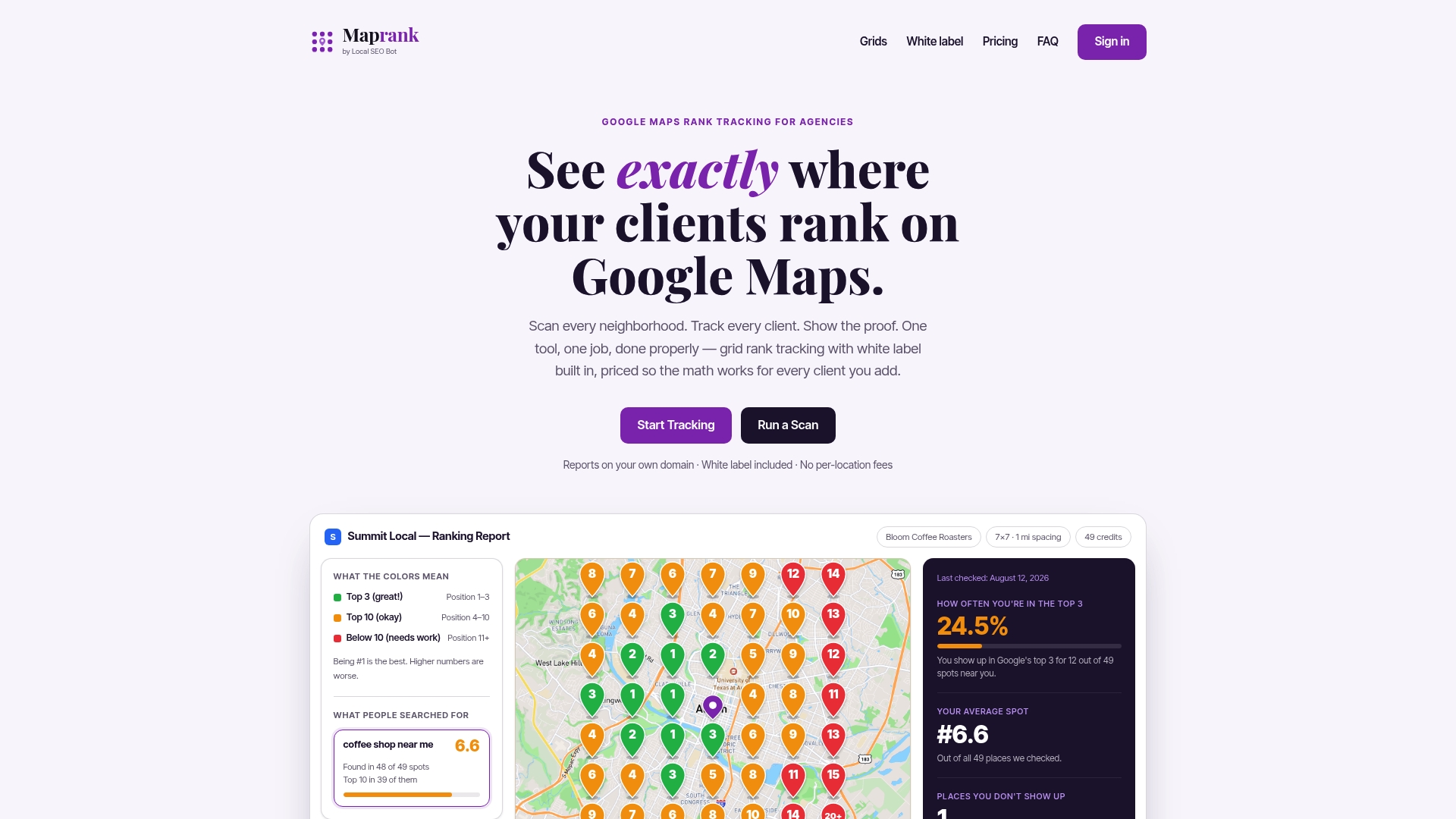
Here is what we offer for this measurement:
- Customizable grid scans, so you pick the area and spacing
- White-label reporting on your own domain
- Unlimited businesses on every plan
- Per-scan credit pricing, with plans from $19 per month on Maprank Solo
- No Google account integrations required
Run a one-off rank check before your photo refresh, then scan again a few weeks later to see what changed.
FAQ
Do photos help Google Business Profile ranking?
Photos help engagement, and that may support visibility indirectly, but no confirmed test proves photos are a direct ranking factor. Moz reports that businesses with photos are more likely to get direction requests and website clicks.
Does geotagging photos improve GBP rankings?
There is no consistent evidence that it does. Practitioner guidance says image quality and relevance matter more than EXIF metadata, so spend your effort on real, accurate photos instead.
What are the right photo sizes and formats for Google Business Profile?
Use JPG or PNG files between 10 KB and 5 MB, with a recommended 720 x 720 resolution and a 250 x 250 minimum, per Google’s photo tips.
How long do new photos take to appear?
Uploads may take 24–48 hours to show while they are reviewed. Check the status in your profile, which can read Pending, Not approved, or Live.
Sources
- Tips for business-specific photos on your Business Profile - Google Business Profile Help
- 30 Google Business Profile Photos Your Local Business Can Easily Take — Illustrated - Moz
- Photos and videos for Google Business Profile