Compliant Agency Rank Tracking Without Client Google Login by CID
Compliant Agency Rank Tracking Without Client Google Login by CID

Yes, you can track Google Maps and local-pack positions without ever connecting a client’s Google account. The method is a geo-grid scan: a tool searches from dozens of coordinate points and identifies the business by its persistent Google identifier, known as a CID, instead of logging into anything. You still need owner-level access for profile edits, but for monitoring and reporting, grid scans are enough.
TL;DR:
- Geo-grid scans can track local pack rankings without requiring a client’s Google account or OAuth authorization, using business CID for identification.
- Typical grids for small areas use 7x7 points, while larger regions may need 9x9 or bigger, depending on the service area’s size and travel distance.
- Cost scaling is based on scan volume and frequency, with credit-based models preferred over flat per-location fees for agencies managing multiple clients.
- Owner access is only necessary for editing, responding to reviews, or verifying locations, not for routine rank monitoring.
- Repeating scans at control points helps differentiate genuine ranking shifts from temporary fluctuations caused by personalization or technical variance.
Table of Contents
- What geo-grid rank tracking actually measures
- Why you can’t just log into Google instead
- Setting up repeatable grid scans with no client login
- Reading the grid: relevance, distance, and prominence
- Turning grid data into a report clients actually read
- Budgeting scan credits without guessing
- When a scan is enough, and when you need owner access
- Maprank: grid tracking built for agencies, not accounts
- FAQ
- Sources
What geo-grid rank tracking actually measures
Geo-grid tracking works by simulating a search from many separate points across a service area, then recording where a business appears in the local pack at each one. Instead of asking “where do we rank?” you ask “where do we rank from this street corner, and from that one three miles north?” The answer is often very different.
Agencies typically run scans in a 7x7 grid (49 points) or a 9x9 grid (81 points), spaced to match the size and density of the service area. A 9x9 grid over a small town will overshoot; the same grid over a sprawling metro area might undershoot. Grid spacing should reflect how far a real customer would reasonably travel.
This is worth separating clearly from organic web rank tracking. Checking where a page ranks for a keyword in standard Google Search is a different job, with different tools and different data. Geo-grid scanning is specific to the map pack: the three to six local business listings that show up with a map, a star rating, and a “directions” button.
Why you can’t just log into Google instead
It would be simpler, in theory, to connect every client’s Google Business Profile and pull ranking data straight from an API. In practice, that path is narrower than it looks. Google’s Business Profile APIs require OAuth 2.0 authorization, which means the actual account owner has to sign in and grant consent before any programmatic access happens. An agency cannot quietly act on a client’s behalf through a shared login or a workaround credential; Google’s own policy on indirect access treats that as a violation, not a shortcut.
That matters for two reasons. First, asking every client to hand over Google credentials creates friction, security risk, and a dependency that breaks the moment someone changes a password. Second, it is not even necessary for the core job of tracking visibility. Grid scanning is an external, observational technique: it searches Google the way a real customer would and records the results. No API key, no OAuth token, no consent screen required.

Owner access still matters for a different set of tasks: editing business information, responding to reviews, verifying a new location. Reserve that step for when a client actually needs to make a change, not for routine rank monitoring.
Setting up repeatable grid scans with no client login
Running a clean grid scan is mostly about getting the inputs right before the first search ever fires. A few decisions upfront save a lot of noisy, unusable data later.
- Identify the business by CID, not name and address. A Google CID is a persistent identifier tied to a specific Business Profile listing, so it survives name changes, address formatting differences, and duplicate listings that would otherwise confuse a tracker.
- Pick a grid size that matches the service area. A dense urban neighborhood might only need a 7x7 grid with tight spacing, while a regional service business covering several towns needs a wider 9x9 pattern.
- Set the device and query mix. Local search behavior skews mobile, so a split around 70% mobile and 30% desktop reflects how people actually search, and testing both a “near me” phrase and a “in [city]” phrase catches different intent patterns.
- Capture structured data for every point. Each scan result should log the timestamp, the exact coordinates, the rank (or confirm absence), the search centroid, and ideally a screenshot or saved result URL for later audits.
- Add control points and repeat the scan. Running the same grid more than once, with a couple of fixed reference points, helps you tell a real ranking shift from a temporary fluctuation caused by personalization or server-side variance.
Pro Tip: Run your first scan twice within the same hour before you trust the baseline; local results can shift between identical searches minutes apart.
Reading the grid: relevance, distance, and prominence
A grid of numbers is only useful once you know what pattern you’re looking at. Google’s own guidance frames local ranking around three factors: relevance, distance, and prominence, and each one leaves a distinct fingerprint on a grid.
- A business that ranks well near its own address but fades fast at the grid’s edges is usually a distance problem: real proximity, not relevance or reputation, is doing the work.
- A business that barely shows up anywhere on the grid, even close to its own door, usually has a relevance gap: the category, the business description, or the profile content doesn’t match the search terms well enough.
- A business that ranks in the same mediocre position across the whole grid, neither strong nearby nor collapsing at distance, usually points to a prominence issue: thin reviews, weak citations, or limited signals elsewhere on the web.
The fixes scale differently too. Relevance problems, like a mismatched primary category or missing service keywords in the profile, can often be corrected within days. Prominence problems, built on review volume and citation consistency, tend to move over a quarter rather than a week. Either way, re-scan the same grid afterward to confirm the fix actually changed the pattern instead of assuming it did.
Turning grid data into a report clients actually read
A spreadsheet full of coordinates means nothing to a client who just wants to know if the campaign is working. The translation step is where a grid scan earns its keep.
The most useful deliverables tend to be a visual heatmap of the grid, a short summary table by neighborhood, a map showing where the business holds a top-three position, and a plain list of recommended next actions. A CSV export alongside the visuals gives clients (or their accountants) something to audit later if questions come up.
Frame the findings as opportunity, not just data: “you’re strong downtown but invisible west of the river” is a business insight, while “rank 11 at coordinate 42.33, -83.04” is not. White-labeled PDF reports, delivered on a set schedule such as monthly, make the whole exercise feel like a managed service rather than a one-time favor.
Budgeting scan credits without guessing
Grid tracking costs scale with a few clear levers: how dense the grid is, how often you re-scan, how many keywords you track per location, and how many devices you simulate for each point. A small, single-neighborhood business might only need a modest, infrequent grid. A regional chain tracking several keywords across multiple cities needs meaningfully more scan volume every month, and storage for the accumulated screenshots adds up over time too.

This is exactly why per-scan credit pricing tends to work better for agencies than flat per-location fees: costs scale with actual usage, not with an arbitrary count of client accounts. A pricing model with unlimited businesses and transparent credits makes it far easier to quote a new client without recalculating your whole margin structure.
When a scan is enough, and when you need owner access
My working rule is simple: grid scans handle monitoring and diagnosis, owner access handles execution. If the question is “where do we stand and why,” a scan answers it without anyone touching a client’s Google account. If the question is “let’s fix the category field” or “let’s reply to that review,” someone with legitimate owner access has to do it.
The cleanest workflow runs in three steps: report what the grid shows, prioritize which issues are worth fixing first, then request owner access only for the specific, approved changes that actually require it. That keeps the client relationship low-friction while still being honest about what a scan can and can’t do on its own.
— Local
Maprank: grid tracking built for agencies, not accounts
We built Maprank around the exact workflow described above: scans identify businesses by CID, not by a connected Google account, so onboarding a new client never involves asking for their login. Our plans include customizable grid sizes, unlimited trackable businesses, and white-label reporting on your own domain, which makes client delivery look like an in-house service rather than a rented tool.
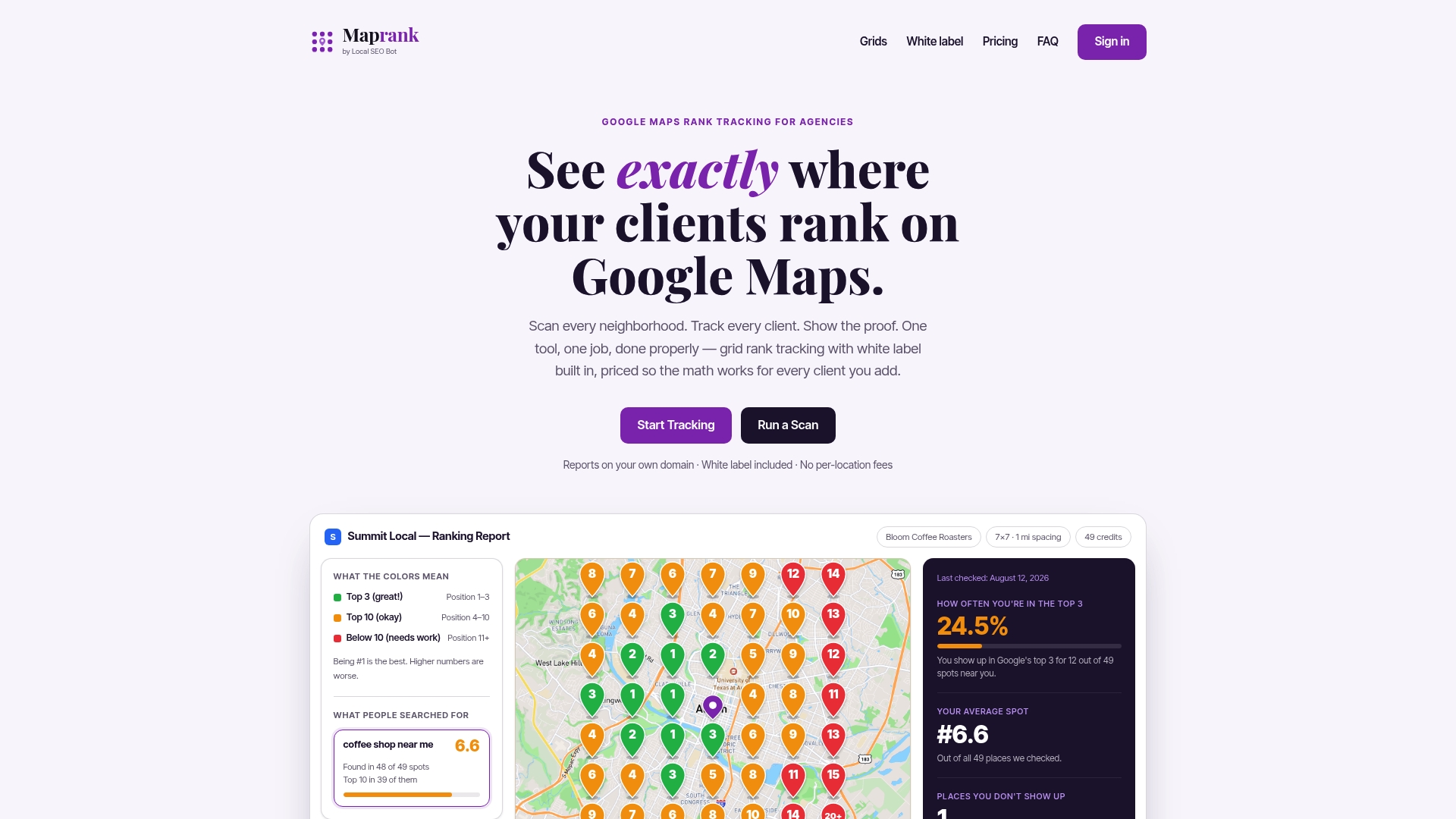
- Build grids from 7x7 up to larger configurations depending on the service area.
- Pull white-label PDF and CSV reports for client-ready delivery.
- Pay with straightforward scan credits instead of per-location fees that punish growth.
If you want to see what a scan looks like before committing to a plan, you can run a one-off rank check on a single business first. For agencies ready to track multiple clients on an ongoing basis, the full plan lineup covers everything from solo freelancers to larger agency teams.
FAQ
Can you track Google Maps rankings without a Google account?
Yes. Geo-grid tracking identifies a business by its CID and searches Google from many coordinate points, so no Google account or OAuth connection is required for monitoring purposes. Owner access is only needed for actions like editing listing details or replying to reviews.
What is a CID and why does it matter for rank tracking?
A CID is a persistent identifier Google assigns to a specific Business Profile listing, and it stays stable even when the business name, address formatting, or category changes. Tracking by CID avoids the duplicate-listing confusion that can happen when a tool matches on name and address alone.
What grid size should an agency use for local rank tracking?
A 7x7 grid (49 points) works well for smaller or denser service areas, while a 9x9 grid (81 points) suits larger or more spread-out regions. The right choice depends on how far a realistic customer would travel to reach the business.
Is it legal or allowed to track rankings without connecting a Google account?
Grid scanning is an external, observational search technique and does not require the API access that triggers Google’s OAuth consent requirements. Those consent rules apply specifically to programmatic actions on a Business Profile, such as edits, not to simulating ordinary search queries from different locations.
How much does grid-based rank tracking cost for agencies?
Pricing varies by provider, but credit-based models tend to scale with actual scan volume rather than charging a flat fee per client location. Maprank’s plans start with Maprank Solo at $19 per month, with higher tiers for agencies tracking more businesses or running larger grids.