Agency Ready Local SEO Reporting Cadence With Automated Grid Scans
Agency Ready Local SEO Reporting Cadence With Automated Grid Scans

The strongest approach layers three cadences: weekly operational checks for problems that need fast action, monthly client-facing reports for trend confidence, and quarterly strategic reviews that connect rankings to revenue. The right mix shifts with a client’s risk level, how fast their market moves, and what they actually asked for when you onboarded them. The sections below cover exactly what goes in each layer, when to add a weekly check, and how to automate the whole cycle.
TL;DR:
- Weekly checks should be reserved for high-risk accounts or active multi-location rollouts, focusing on urgent issues like profile suspensions or ranking drops.
- Monthly reports must track geogrid share, local keyword trends, and review metrics to accurately reflect changes in visibility and lead potential.
- Quarterly strategic reviews are essential for connecting local performance to business outcomes and adjusting reporting frequency based on client risk and expansion plans.
- Automation tools like scheduled scans, alert rules, and templated narratives are vital to managing multiple accounts efficiently and maintaining consistent reporting cycles.
- Using a risk, velocity, and scope scoring system during onboarding and quarterly reviews helps tailor cadence to each client’s evolving market position and needs.
Table of Contents
- The layered cadence: what weekly, monthly, and quarterly reporting each do
- What belongs in a monthly local SEO report
- When weekly checks earn their place
- Turning monthly data into a quarterly strategic review
- Automation and templates that make the cadence sustainable
- A simple framework for setting cadence per client
- Agency perspective: common mistakes with report cadence
- How Maprank fits into your reporting cadence
- FAQ
- Sources
The layered cadence: what weekly, monthly, and quarterly reporting each do
Each layer answers a different question, and conflating them is why agencies either overwhelm clients with noise or bore them with vague summaries.
Weekly operational checks are internal. Nobody sends these to clients unless something breaks. They exist to catch a suspended Google Business Profile, a crawl error, or a sudden ranking drop in a neighborhood that drives real revenue before it becomes a crisis the client discovers first.
Monthly client reports are the core deliverable. They answer whether visibility, traffic, and leads moved in the right direction, and they give owners and marketing managers enough context to feel informed without drowning in raw data. Send these within the first five business days of the new month, once the prior month’s data has settled.

Quarterly strategic reviews step back from the data and talk business. These map local performance to budget decisions: should the client expand into new service areas, increase ad spend, or shift priorities for the next quarter.
A simple matrix helps assign cadence by client type:
- Single-location, stable client: monthly reports only, with weekly checks reserved for incident response.
- Multi-location or recently launched client: weekly checks plus monthly reports.
- High-spend or high-risk client (reputation issues, competitive market): all three layers active from day one.
- Retainer client near a contract renewal: add a quarterly review even if their risk profile is otherwise low.
What belongs in a monthly local SEO report
A monthly report should answer three questions in order: are we improving, what is working, and what should happen next. Everything else is supporting evidence.
The core metrics worth tracking every month:
- Geographic visibility (geogrid share): the percentage of grid points where the business appears in the map pack, which shows coverage a single keyword rank cannot.
- Local keyword ranking trends: movement over the trailing 30, 60, and 90 days, not just a snapshot.
- Google Business Profile metrics: searches, views, and actions like calls or direction requests.
- Review volume and sentiment: new reviews, average rating shifts, and response time.
- Organic traffic by location: sessions and users segmented by service area or landing page.
- Lead counts and conversions: calls, form fills, or booked jobs tied back to organic and local channels.
Because some Business Profile metrics update only monthly, monthly reporting is the right cadence to catch GBP trends accurately rather than reacting to a partial week of data. The searches metric refreshes at the start of each month and can take up to five days to populate, so pulling GBP numbers mid-month risks showing an incomplete picture.
Structure the report with a short verdict up top, trend charts for context, a line or two of attribution explaining what likely drove the change, and a short list of recommended actions. For visualization, a geogrid heatmap communicates map pack coverage better than a ranking table, sparklines give trend context without a full chart, and a single headline number per metric helps a busy owner feel confident in thirty seconds.
When weekly checks earn their place
Weekly monitoring is not for every client. It is justified when the account carries real risk: an active multi-location rollout, a reputation incident in progress, recent algorithm volatility in that market, or a client who has explicitly asked for tighter oversight.
A fast weekly triage checklist:
- Crawl and index errors on the client’s site or Business Profile listing.
- Google Business Profile status, confirming the listing is live and not suspended.
- Spikes in negative reviews or a sudden drop in average rating.
- Sudden ranking loss in the neighborhoods that drive the most leads.
- Redirect issues or site downtime alerts from uptime monitoring.
Most weeks produce nothing worth sending. Escalate to the client only when an item crosses a real threshold, like a suspended profile or a multi-point rating drop, and batch minor items into the next monthly report instead of pinging the client every time a number wiggles.
Turning monthly data into a quarterly strategic review
A quarterly review is where local SEO data stops being a report and starts being a business conversation. It belongs in front of decision-makers, not just the marketing contact.
What to bring to the table:
- Business KPIs: revenue or booked jobs attributable to organic and local channels over the quarter.
- Territory-level trends: which neighborhoods or service areas gained or lost visibility, and why.
- ROI signals: cost per lead from local search compared to paid channels, where data allows.
- Experiment outcomes: results from any test, like a new Google Business Profile category or a landing page rebuild.
Translate grid visibility and ranking percentages into lead and revenue language the client’s finance side understands. A quarterly review is also the natural moment to recommend a cadence change: a client expanding to five new locations probably needs weekly checks added, while a stable, low-risk account might be fine dropping to a lighter monthly-only cycle.
Automation and templates that make the cadence sustainable
None of this works by hand once an agency manages more than a handful of accounts. Automation should cover the repetitive parts so your team spends time on judgment, not data entry.
Useful automation patterns:
- Scheduled grid scans that run automatically on a fixed interval instead of triggering manual pulls.
- Alert rules for Business Profile status changes or review score drops that bypass the weekly checklist and notify someone immediately.
- Templated narrative blocks that auto-populate month-over-month comparisons so writers only edit the interpretation, not rebuild the structure.
A live dashboard works for internal weekly triage since your team needs raw, current numbers. Clients are better served by a scheduled, white-labeled PDF that tells a story rather than dumping a data feed on them.
When choosing a reporting tool, prioritize geogrid tracking for neighborhood-level visibility, white-label exports so reports carry your agency’s branding, a built-in scheduler, and pricing that does not punish you for adding more client accounts. Maprank’s local SEO rank tracker is built around exactly those features.
Pro Tip: Build one master report template per client tier (light, standard, high-touch) instead of customizing from scratch every month.
A simple framework for setting cadence per client
A quick scoring approach beats guessing. Rate each client on risk, pace of change in their market, scope (number of locations), and stated preference, then let the total point you toward a cadence.
- Score risk: reputation issues, past penalties, or a volatile competitive set push the score up.
- Score velocity: frequent site changes, new locations, or active campaigns push it up further.
- Score scope: single location scores low, multi-location scores high.
- Factor client preference: a client who explicitly wants more visibility overrides a low technical score.
Ask during onboarding: how many locations do you have, has anything changed recently that could affect rankings, and how involved do you want to be month to month. Red flags that should bump a client straight into weekly monitoring include a recent profile suspension, a sudden wave of negative reviews, or a planned location launch in the next 60 days.
Pro Tip: Revisit the cadence score every quarter, not just at onboarding. Client risk profiles change as fast as their business does.
Agency perspective: common mistakes with report cadence
The most common mistake is overloading monthly reports with every available metric while skipping the narrative that explains what it means. The fix is simple: cut the chart count, write three sentences of plain interpretation, and let the data support the story instead of replacing it.
— Local
How Maprank fits into your reporting cadence
Running this layered cadence by hand across dozens of clients eats hours you could bill elsewhere. We built our grid rank tracking to help agencies automate the scanning work and keep the storytelling.
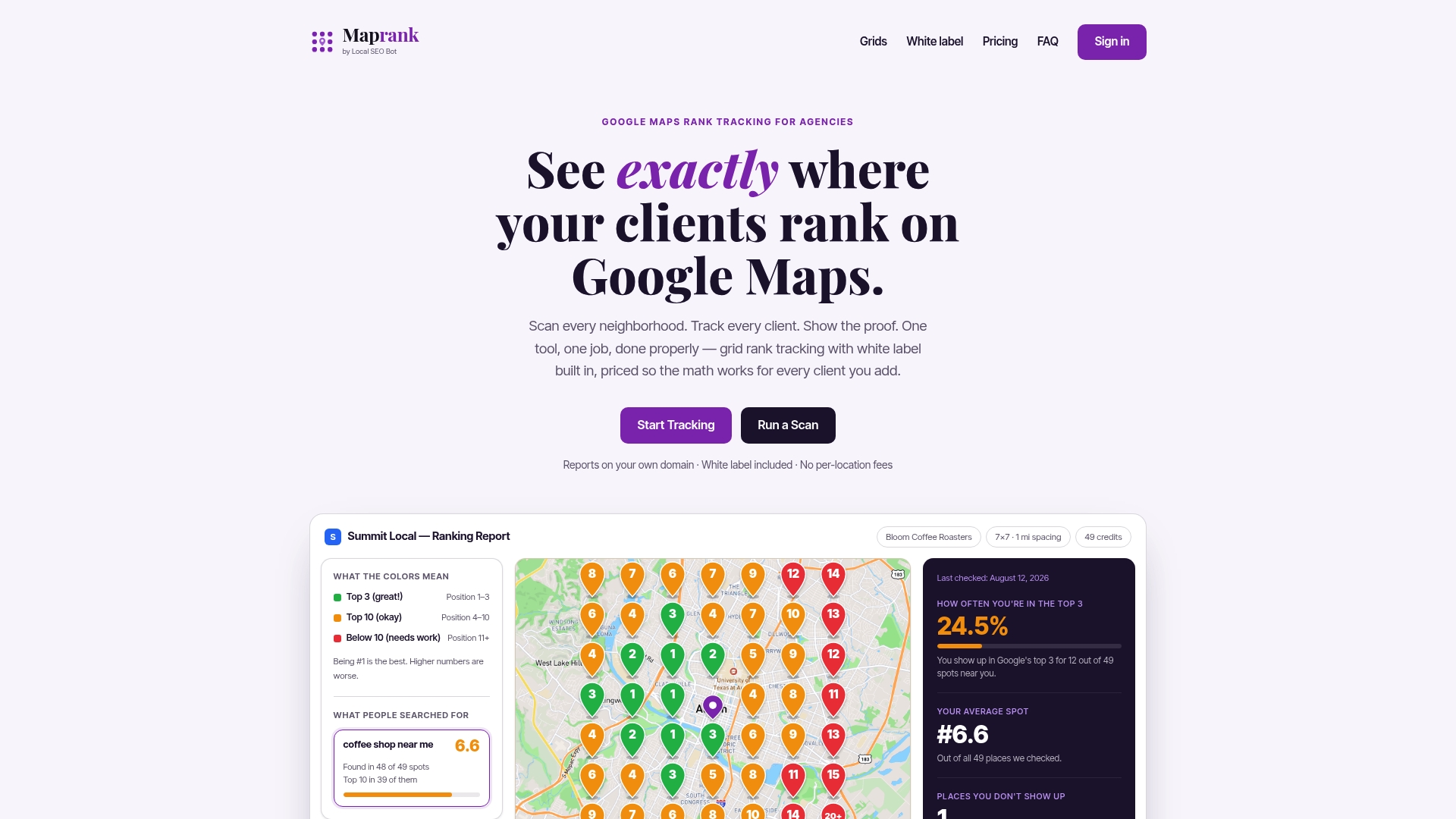
With our tool, you can schedule recurring grid scans without connecting client Google accounts, export white-labeled reports on your own domain, and track unlimited businesses so adding a new client never means a pricing surprise.
- Weekly layer: scheduled scans flag ranking shifts in priority neighborhoods automatically.
- Monthly layer: export a white-label PDF straight from your scan history.
- Quarterly layer: pull territory-level grid data into the strategic review to show coverage gains over the full quarter.
If you want to see what this looks like for a specific client before committing to a plan, start with a one-off rank check, or go straight to the Maprank landing page to compare plans and set up scheduled scans for your whole roster.
FAQ
What is the 80/20 rule in SEO?
The rule in SEO suggests that a small share of your efforts, like fixing core technical issues or optimizing your highest-traffic pages, tends to drive most of your results. For local SEO reporting, this means focusing monthly reports on the handful of metrics (geogrid visibility, GBP actions, and leads) that actually move the needle, rather than listing every number you can pull.
What is a reporting cadence?
A reporting cadence is the regular schedule on which an agency delivers performance updates to a client, such as weekly, monthly, or quarterly. For local SEO, a layered cadence combining all three intervals tends to balance fast incident response with clear long-term trend visibility.
Is SEO still worth it in 2026?
Local SEO remains a core channel for businesses that depend on nearby customers finding them in map results and organic search, as explained in this practical guide for UK businesses. Its value depends on consistent tracking and reporting, since visibility and Business Profile metrics shift over time and businesses that monitor them closely can respond faster to drops or opportunities.
How much should I pay for local SEO?
Pricing varies widely depending on whether you are paying an agency for full-service local SEO or paying for the tools agencies use internally, like rank tracking software. For tool costs specifically, Maprank plans range from $19 per month for solo consultants up to $149 per month for agencies managing larger client rosters, with annual billing available at a discount.