Cut Alert Noise With 3 Position Rank Change Alerts for Agencies
Cut Alert Noise With 3 Position Rank Change Alerts for Agencies
Run weekly geogrid scans and set alerts to fire on moves of three positions or more, or on any loss of top-3 coverage in a grid quadrant. That single setup catches meaningful map-pack shifts without drowning your team in noise. The moment an alert fires, pull up the audit checklist below before you touch anything else.
TL;DR:
- Alerts should be set for position changes of three or more spots or the loss of top-three coverage in two or more grid cells to focus on significant map pack shifts.
- Weekly geogrid scans are sufficient for most clients, with more frequent checks only justified after site migrations, during high competition, or for new accounts.
- Upon alert activation, verify with a repeat scan, assess GBP profile changes, review engagement data, and analyze neighboring grid cells to identify localized versus widespread causes.
- Reports should combine heatmaps, coverage percentages, and relevant business activity metrics to clearly communicate map visibility changes’ impact on revenue.
- Thresholds and scan frequencies should scale with client size and complexity, employing automation for signal detection and human judgment for interpreting cause and business significance.
Table of Contents
- What Are Rank Change Alerts for Google Maps?
- What Metrics and Thresholds Should Trigger an Alert?
- How Often Should You Schedule Scans and Alerts?
- What Should You Do the Moment an Alert Fires?
- How Do You Turn Alerts Into Client Reports?
- Configuration Examples: Alert Rules by Account Size
- Balancing Automation and Human Judgment in Alerting
- Get Rank Change Alerts Running With Maprank
- Sources
- FAQ
What Are Rank Change Alerts for Google Maps?
Rank change alerts are automated notifications tied to your geogrid scans, not your organic keyword rankings. They fire when a client’s position in the local map pack shifts across the grid points you’re tracking, whether that’s one neighborhood or a full metro area.
This distinction matters for agency workflows because map-pack visibility swings for different reasons than organic search does: a competitor’s new review batch, a Google Business Profile (GBP) edit, or a category change can move a business three spots in one quadrant while leaving the rest of the city untouched. A single-point rank check would miss that entirely. Grid-based tracking with weekly scan frequency captures the pattern instead of a snapshot, which is why weekly is the baseline cadence most agencies should run.
Catching a drop early prevents it from becoming a client’s angry email a month later. When an alert correlates with a dip in GBP Insights metrics like calls, direction requests, or website clicks, you have something more useful than a position number. You have a business outcome.
- Early detection helps you address problems quickly, often within the same week.
- Correlating rank shifts with calls, directions, and site visits shows clients the real cost of a drop.
- Thresholded alerts help avoid spending time on minor fluctuations that are not significant.
Reporting built only on current position, without trend context or activity correlation, tends to undersell the work an agency is actually doing. Alerts fix that by giving you a running record of what changed and when.
What Metrics and Thresholds Should Trigger an Alert?
Most alert fatigue comes from tracking the wrong thing, not too much of it. A local rank monitor should segment by market and keyword group so you’re only notified about changes that matter to a specific client’s revenue, not every minor wobble across the grid.
Three trigger types cover almost everything an agency needs to watch:
- Position triggers. Alert on any priority keyword that moves several spots, or on a noticeable coverage percentage swing across the tracked grid.
- Quadrant triggers. Alert when a client drops out of the top 3 in two or more adjacent grid cells at once. That pattern usually points to something localized rather than a global algorithm shift.
- Event triggers. Alert on a sudden loss of reviews, a GBP profile edit you didn’t make, or a site migration. These are the changes most likely to explain a ranking move before you even open the grid.
Scope every alert by keyword importance and client value. A five-location enterprise client watching 15 terms needs different thresholds than a single-location client tracking two. Tightening thresholds for high-value accounts and loosening them for low-stakes ones keeps your team’s attention where it earns money.
Pro Tip: Set a wider threshold (5+ positions) for keywords ranked 15 or lower. Volatility that far down the pack rarely reflects a real problem, and tightening the net there just buries you in alerts nobody needs to act on.
How Often Should You Schedule Scans and Alerts?
Weekly scans are the right default for nearly every client. Daily checking on a standard account tends to react to noise, minor fluctuations that often reverse themselves within days and typically do not affect calls or revenue. Weekly monitoring paired with monthly reporting gives you enough signal to catch real trends without burning scan credits on flat data.
Certain situations justify stepping up the pace:
- Site migrations or major GBP edits warrant daily or near-continuous scanning for one to two weeks after the change, so you catch a problem before the client notices it.
- Highly competitive commercial keywords, the ones where three competitors are actively running local campaigns, benefit from twice-weekly checks even outside a crisis window.
- New client onboarding often calls for a tighter first-month cadence to establish a real baseline before settling into the weekly rhythm.
- Manual re-checks are worth keeping in reserve for the day an alert fires and you want confirmation before drafting a client email.
Budget scan credits with this in mind. A subscription built around scheduled scans and unlimited businesses lets you run the weekly baseline everywhere and reserve a credit buffer for the accounts that need extra attention that month.
What Should You Do the Moment an Alert Fires?
An alert is a starting point, not a conclusion. Work through this sequence before drafting anything for the client:
- Confirm it. Run a repeat scan. A single anomalous read, caused by a temporary Google glitch or a caching issue, isn’t worth investigating further.
- Audit the GBP profile. Check for category changes, missing attributes, recent posts, new photos, or edits you didn’t make. A ranking drop diagnosis almost always starts here.
- Check engagement data. Pull GBP Insights for calls, direction requests, and website clicks over the same window. A rank drop with flat engagement is a different story than one with real traffic hit.
- Scan the surrounding grid. If the drop shows up in two adjacent cells but the rest of the grid is stable, you’re likely looking at a localized cause: a nearby competitor’s review push, a new listing, or a proximity shift. A drop across the whole grid points somewhere bigger, a core algorithm update or a site-wide technical issue.
- Draft the summary. If the cause is client-facing (a bad review cluster, a competitor’s new listing), write a one-page note with what happened and what you’re doing about it.
That fourth step is the one agencies skip most often, and it’s usually the fastest way to tell a localized blip from a market-wide problem:
- Localized drop (1-2 cells): check reviews, listings, and nearby competitor activity first.
- Grid-wide drop: check for site changes, GBP suspensions, or a broader ranking update before anything else.
How Do You Turn Alerts Into Client Reports?
A position number alone tells a client almost nothing. A heatmap comparison against last month’s scan, side by side with a top-3 coverage percentage and a month-over-month arrow, tells them exactly what changed and whether it’s good news.
Every report should include:
- A visual heatmap pair (current period vs. prior period) so the client can see the shift without reading a table.
- A single top-3 coverage percentage with a clear up or down arrow from the previous month.
- One sentence, bolded, that states the most significant win or issue of the period. Nothing else competes with it for attention.
- Correlated business activity: change in review count, calls, direction requests, and website clicks pulled from the same window as the rank data.
That last point is what separates a report that proves value from one that just logs numbers. A client doesn’t care that a keyword moved from position 6 to position 3. Pairing rank data with a CRM or performance report on lead volume closes that loop and makes the alert data mean something in dollar terms.
Configuration Examples: Alert Rules by Account Size
Alert rule-sets should scale with account complexity, not stay identical across every client on your roster.
- Small accounts (1 to 3 priority keywords): weekly scan, alert if top-3 coverage drops across more than two adjacent grid cells. Simple, low-maintenance, appropriate for a single-location client without heavy competition.
- Mid-size agencies (5 to 15 priority keywords per client): weekly baseline scan plus a mid-month spot check on the top 3 terms, with a team SLA to investigate any alert within 48 hours.
- Enterprise accounts (multi-location, dozens of keywords): scheduled cron-style scans across every location, with automated pre-filtering so the team only sees alerts tied to meaningful average grid rank or coverage percentage deltas, not every minor fluctuation.
Pro Tip: Write your SLA down and share it with the client. “We investigate any priority alert within 48 hours” sets an expectation that protects your team from constant check-ins and gives the client a concrete reason to trust the process.
Customizable scan grids let you match the grid size and spacing to the account tier instead of running the same 5x5 grid for a single storefront and a ten-location chain. That’s the configuration layer that makes these three rule-sets workable without hiring a full-time analyst to babysit them.

Balancing Automation and Human Judgment in Alerting
Automation is good at one thing here: surfacing the signal. It cannot tell you why a competitor suddenly outranks your client in two grid cells, or whether that matters to the client’s bottom line. That interpretation still needs a person who knows the account.
The mistake I see most often is treating every alert as urgent. Thresholds exist precisely so your team isn’t reacting to a two-position wobble that reverses itself by Thursday. Set the threshold, trust it, and spend your saved time on the alerts that actually move revenue.
Client conversations should follow the same logic. Nobody outside your industry cares that a keyword moved from rank 4 to rank 7. They care whether the phone rang less this month. Frame every alert in those terms, and the automated signal becomes a real business conversation instead of a spreadsheet update.
— Local
Get Rank Change Alerts Running With Maprank
Maprank is built around the exact workflow this guide describes: customizable scan grids, thresholded alerts, and white-label reports that go out under your agency’s own name, not Maprank’s.
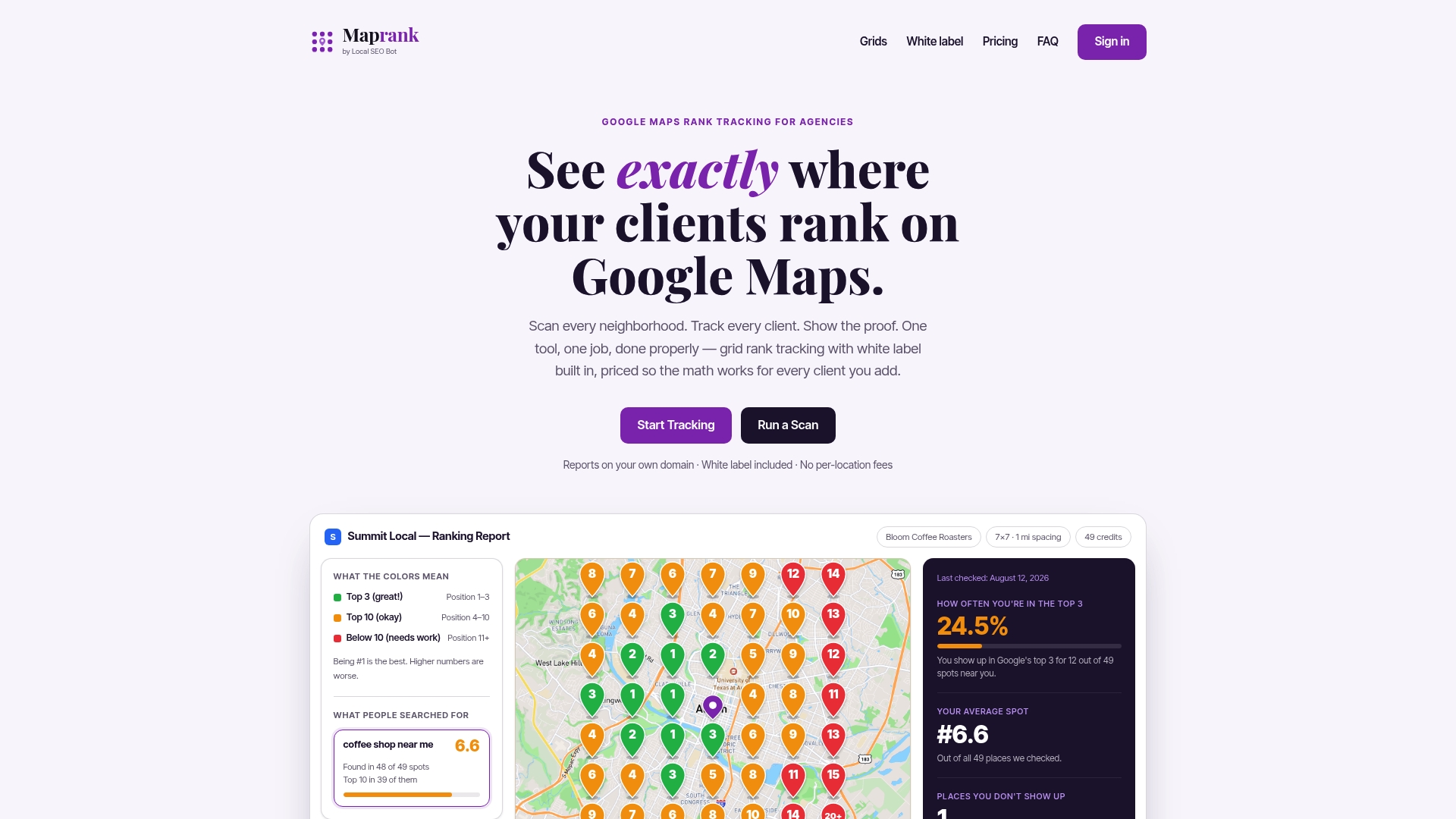
Every plan includes unlimited businesses, so you’re not paying more just because a client adds a second location or a new team member joins the account. Pricing runs on scan credits instead of a per-location fee, which means the cost structure doesn’t punish you for growing. Most agencies start with a single rank check to see the grid data for one client, then move to a subscription once they’re ready to run scheduled scans and alerts across the whole roster. Plans start at a monthly rate for solo operators and increase for agencies managing more locations and keywords. If you’re ready to set up your first weekly scan and alert threshold, check current plans and grid options and get your first client reporting on autopilot.
Sources
For a deeper look at grid methodology and heatmap interpretation, see LocalSEOData’s geogrid guide. For a full walkthrough of diagnosing a ranking drop, Moz’s profile audit guide covers the multi-factor checklist referenced earlier in this article.
- Google Maps Ranking Report for Agencies (2026) | Lead Oracle AI Blog
- Google Business Profile ranking drop: diagnosis and fix | Moz
- SEO Rank Tracking Tools & Local Rank Tracking Explained | ProRank
FAQ
What Counts as a Meaningful Rank Change Alert?
A meaningful alert is a move of three or more positions on a priority keyword, or a loss of top-3 coverage across two or more adjacent grid cells. Smaller fluctuations are usually noise and don’t need investigation.
How Often Should Agencies Run Geogrid Scans?
Weekly scans are the standard baseline for most clients, since meaningful ranking patterns typically develop over a week to a month. Daily or continuous scanning only makes sense during site migrations, major GBP edits, or for highly competitive commercial keywords.
Does Frequent Rank Scanning Risk a Google Penalty?
No. Geogrid scans query publicly accessible map results, the same way a normal user search would, so frequent scanning does not trigger a penalty.
What Does Maprank Cost for an Agency?
Maprank runs on four tiers: Solo at $19 a month, Agency at $39 a month, Pro at $79 a month, and Scale at $149 a month, all billed monthly or at a discount annually. Every tier includes unlimited businesses and white-label reporting, with pricing scaling by scan credits and grid size rather than per-location fees.
What Should You Check First After a Localized Drop?
Start with the Google Business Profile itself: recent edits, category changes, and new competitor reviews nearby. A drop confined to a few grid cells usually points to a local cause rather than a broader algorithm shift.