Geo Grid Voice SEO For Agencies: Prove Local Wins In 90 Days
Geo Grid Voice SEO For Agencies: Prove Local Wins In 90 Days
Fix three things first: a fully completed Google Business Profile, 8 to 10 FAQ answers written in plain spoken language, and a mobile page that loads fast enough for an assistant to trust it. Those three assets decide who gets read aloud when someone asks “best plumber near me.” Smart-speaker ownership has climbed high enough that ignoring this is no longer optional, schema.org already documents the markup that helps assistants extract your answer. A geo-grid rank tracker can show you whether those fixes are actually landing at the neighborhood level.
TL;DR:
- Completing Google Business Profile fields, writing natural 8-10 FAQ answers, and fixing NAP consistency are the highest impact, quick improvements for local voice visibility.
- Structured data and question-format content on your website enhance the accuracy and extraction of voice answers, with local schema types providing added support.
- Mobile page speed under 2.5 seconds and avoiding intrusive pop-ups are essential to maintain trust and ensure voice assistants can reliably link to your site.
- Tracking local voice search success requires monitoring calls, directions, GBP insights, and neighborhood-level rank scans, as single-point checks are insufficient.
- Prioritizing GBP and review optimization over schema and web content is crucial, as early results show within 90 days while schema-based gains may take 3-6 months.
Table of Contents
- Why Voice Search Matters for Local Businesses
- How Voice Assistants Pick Local Answers
- High-Impact Quick Wins You Can Do in 1 to 3 Weeks
- On-Site Content and Structured Data for Voice Extraction
- Technical and Mobile Requirements That Make or Break Voice Answers
- Measurement and Tracking: Proving Voice and Local Visibility
- A 12-Week Rollout Playbook for Agencies
- How Local Dialects and Conversational Speech Affect Voice Search
- Voice Search SEO and Smart Home Devices
- Optimizing Natural Language and Long-Tail Keywords for Voice
- How Assistants Choose Between GBP, Snippets, and Schema
- Where to Focus First: A Sequencing Question, Not a Feature List
- Maprank: Measuring Whether Your Voice Fixes Are Actually Working
- Sources
- FAQ
Why Voice Search Matters for Local Businesses
Roughly 35% of Americans now own a smart speaker, and NPR and Edison Research found that owners use them constantly, not occasionally. Pair that with Statista’s tracking of steadily rising voice assistant use, and you get a channel that’s grown past the point where “we’ll get to it eventually” makes sense.
Statistic Callout: Smart-speaker ownership has reached about 35% of American adults, and those owners report using voice assistants on a near-daily basis, according to NPR’s reporting on Edison Research data.
Here’s what makes voice different from typing a search into Google: there’s no page two. When someone asks Alexa or Google Assistant a local question, the device speaks one answer, maybe two if you’re lucky enough to hear a follow-up offer. Ranking fourth on a screen still gets clicks. Ranking fourth in a voice query gets nothing. Local voice queries also carry unusually direct intent, and plenty of that traffic converts into a call or a visit within the same day.
Think about the actual phrasing people use. Nobody says “HVAC repair company reviews Denver.” They say things like:
- “Is [business name] open right now?”
- “What’s the cheapest oil change near me?”
- “Who does emergency plumbing near me tonight?”
Every one of those questions has a single correct answer sitting in a database somewhere, usually your Google Business Profile or a snippet pulled from your website. Winning that single slot is the entire game.
How Voice Assistants Pick Local Answers
Voice assistants don’t crawl the open web the way a person browsing Google does. They pull from a narrower set of trusted sources: Google Business Profile, Apple Business Connect, Bing Places, featured snippets, and structured data sitting on your own site. Understanding which of those sources feeds which assistant is the difference between guessing and actually improving your odds.
Google Assistant leans hardest on Google Business Profile data, supplemented by featured snippets when a question goes beyond basic facts like hours or address. Siri pulls heavily from Apple Business Connect and Apple Maps listings, an asset most agencies never touch because it doesn’t carry the “SEO” label. Alexa relies on a mix of Amazon’s own local data partnerships and, for many categories, Yelp and similar directories, which is exactly why NAP consistency across third-party sites still matters in a voice context.
The signals that carry the most weight across all three ecosystems are remarkably consistent:
- Accurate hours, including holiday exceptions. An assistant that tells a caller you’re open on Thanksgiving when you’re actually closed creates a bad experience that gets blamed on you, not the software.
- Primary category and services list. Vague or outdated categories confuse the matching logic that decides whether your business even qualifies as an answer.
- Attributes. Wheelchair accessible, outdoor seating, appointment required. These small checkboxes often decide tie-breaks between two similarly ranked businesses.
- Review recency. A business with 200 reviews from 2019 reads as less trustworthy to ranking algorithms than one with 40 reviews, most from the last six months.
- NAP consistency. Name, address, and phone number need to match exactly across your website, GBP, Apple Business Connect, and every directory that lists you.
- Schema availability. Structured data doesn’t guarantee a voice answer, but its absence makes it much harder for an assistant to extract a clean one.
If you’re deciding where to spend the first hour of effort, spend it on Google Business Profile completeness and review recency. Those two levers touch the largest share of voice-driven local queries, and they’re also the fastest to fix. Apple Business Connect and Alexa-specific signals matter, but they’re a second-wave project once the foundation is solid.
High-Impact Quick Wins You Can Do in 1 to 3 Weeks
This is the part where effort and payoff actually line up. None of the following requires a developer, a redesign, or a budget increase. It requires about three weeks and a checklist.
- Complete every field on your Google Business Profile. Hours (including special hours for holidays), phone number in a consistent format, services listed individually rather than bundled into one vague line, and every relevant attribute checked. Incomplete profiles rank worse and get skipped as voice answer candidates more often than complete ones.
- Write 8 to 10 GBP Q&A entries in natural spoken language. Don’t write “Parking Information.” Write “Is there parking available near your location?” and answer it the way you’d say it out loud. This is one of the most overlooked tactics in local SEO, and it directly builds a bank of extractable answers assistants can pull from.
- Audit and fix NAP across every directory and aggregator you can find. Start with the big data aggregators that feed dozens of smaller directories, then check your own website footer and contact page. One wrong digit in a phone number, repeated across 30 sites, is worse than one wrong digit on a single obscure directory.
- Start a review-generation workflow. Ask satisfied customers directly, send a text or email with a direct review link, and follow up once if they don’t respond within a week. The goal isn’t volume alone. It’s recency, since a steady trickle of recent reviews outperforms a pile of old ones sitting untouched.
- Run a quick QA pass to confirm the changes are visible. Search your own business by name and by category plus location, check the knowledge panel that appears, and ask a smart speaker a few of the exact questions you just added to your Q&A section.
Pro Tip: Write your GBP Q&A answers at roughly the same 40 to 60 word length you’d want a featured snippet to read. If an assistant lifts that answer verbatim, you want it to sound like a person talking, not a bulleted spec sheet.
A note on sequencing: do these five in order, not in parallel. NAP cleanup that happens before GBP completion just means you’re fixing inconsistencies against a profile that’s still incomplete. Reviews matter most once the profile itself is accurate, since a glowing review pointing to wrong hours does you no favors.
One more thing worth flagging: agencies managing multiple client locations often discover, once they actually check, that GBP completeness varies wildly between locations that should look identical. A geo-grid rank tracker that scans multiple neighborhoods at once will surface which locations are lagging faster than manually checking each profile one by one.
On-Site Content and Structured Data for Voice Extraction
Your website needs to answer questions the way a person would answer them out loud, formatted so a machine can lift that answer cleanly. That means writing in question-format headings and putting the actual answer in the first sentence or two that follows, not buried three paragraphs down after a story about your company’s history.
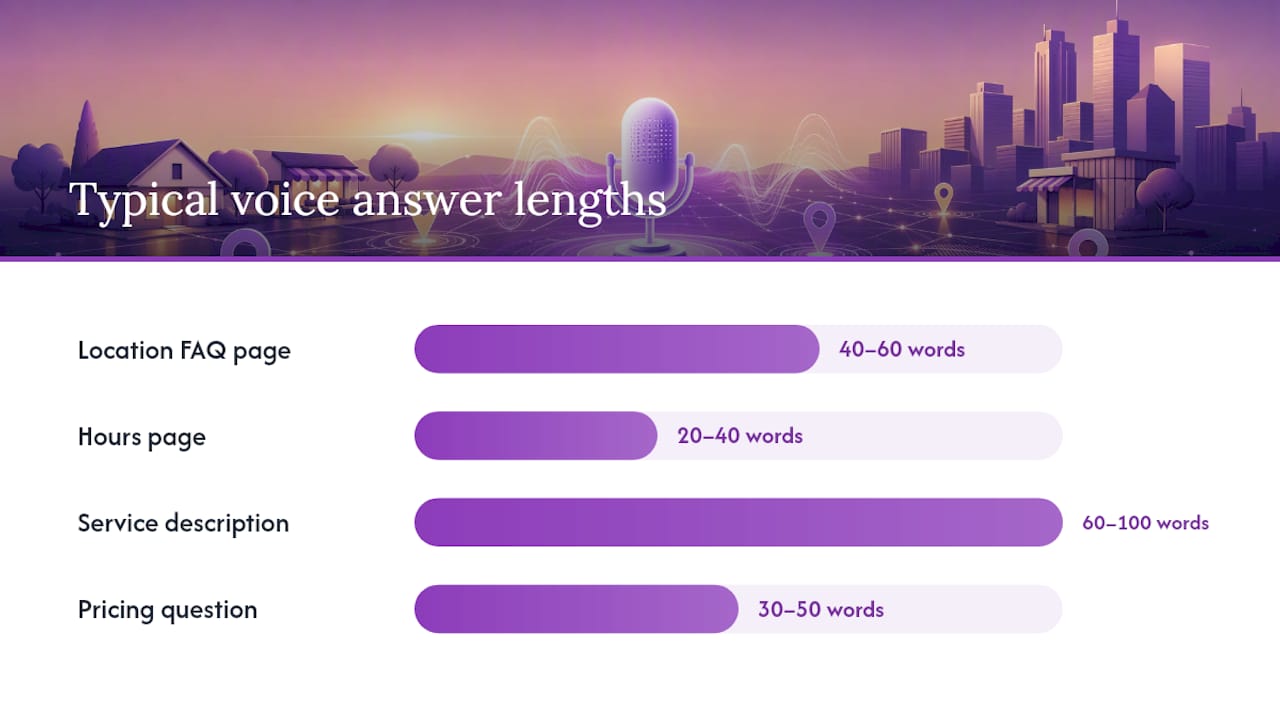
The pattern looks like this: ask the question as an H2 or H3, then answer it directly in 40 to 60 words before adding any elaboration. Network Solutions’ guidance on featured snippets backs this exact structure, since most voice assistants default to reading the featured snippet aloud when one exists for a query.
Structured data does the rest of the work. Schema.org documents the vocabularies most relevant here:
- LocalBusiness schema for your core business facts (name, address, phone, category).
- FAQPage schema wrapped around your question-and-answer content.
- OpeningHoursSpecification nested inside your LocalBusiness markup, including holiday exceptions.
A common mistake is applying FAQPage schema to marketing copy dressed up as questions (“Why Choose Us?”) instead of genuine customer questions with genuine direct answers. Google and other assistants can tell the difference, and vague schema doesn’t help you win an answer slot.
| Page type | Best format for the answer | Typical answer length |
|---|---|---|
| Location FAQ page | Question heading + direct paragraph | 40 to 60 words |
| Hours page | Short paragraph, plain sentences | 20 to 40 words |
| Service description | Paragraph, then a short list of specifics | 60 to 100 words |
| Pricing question | Direct answer with a number or range first | 30 to 50 words |
Build dedicated pages where they genuinely add value: a standalone hours page for businesses with complex or seasonal schedules, location-specific FAQ pages for multi-location businesses, and service descriptions written in the sentences a customer would actually say aloud (“Do you offer same-day appointments?”) rather than internal jargon. Lists work well for enumerating services or specifics; paragraphs work better for anything with nuance, like pricing that depends on scope of work.
Technical and Mobile Requirements That Make or Break Voice Answers
None of the content work above matters if your page loads too slowly for an assistant to trust it as a source. Voice answers frequently link back to a business’s website as a secondary reference, and a slow or broken mobile experience undermines that trust even when the content itself is solid.
Aim for a Largest Contentful Paint under 2.5 seconds and a Lighthouse mobile performance score in the 80s or better. These aren’t arbitrary numbers. They reflect Google’s own Core Web Vitals thresholds for what counts as a “good” mobile experience, and pages that miss them consistently underperform in both traditional and voice-adjacent rankings.
- Avoid intrusive interstitials, especially pop-ups that cover contact information on mobile.
- Keep your phone number and address in plain, crawlable HTML text, not buried inside an image or a JavaScript-rendered widget.
- Make sure tap targets (buttons, phone number links) are large enough for a thumb, not just a mouse cursor.
- Embed an actual Google Map on your contact page, and list the address in plain text right next to it.
Pro Tip: Run your contact page through Google’s Rich Results Test and PageSpeed Insights every time you update your schema or your hosting setup. A markup error that goes unnoticed for months can quietly disqualify you from snippet consideration the entire time.
Build a short developer QA checklist for after every site update: validate structured data, run a mobile speed test, confirm NAP text is selectable and not embedded in an image, and manually test whether your contact info survives a page reload on a throttled connection.
Measurement and Tracking: Proving Voice and Local Visibility
You can’t optimize what you don’t measure, and voice search is uniquely hard to measure directly since most assistants don’t report back which businesses they read aloud. The workaround is tracking the proxies that move when voice visibility improves.
- Calls and direction requests from your Google Business Profile insights, since these are the actions voice queries most often trigger.
- GBP impressions and search queries, which show whether the specific phrases you added to your Q&A section are actually being searched.
- Featured snippet captures for your target questions, checked manually or through a rank tracking tool.
- Mobile conversion events on your website, particularly click-to-call and map-click actions.
The signal most businesses miss entirely is neighborhood-level variation. A single rank check from your office might show you ranking third for “electrician near me,” but that number can shift dramatically block by block. Geo-grid rank tracking scans dozens of points across your service area instead of one, which is exactly why grid-based tracking exists as its own category of tool separate from a basic single-point checker.
Run before-and-after comparisons using the same set of 10 to 15 sample queries every time you scan, spaced two to four weeks apart so you can attribute changes to specific fixes rather than random fluctuation. Escalate to a dedicated tool once you’re managing more than a handful of locations or clients, since manual checking simply doesn’t scale past that point.
A 12-Week Rollout Playbook for Agencies
A phased approach keeps the work from turning into a scattered mess of half-finished tasks. This sequence works well for agencies managing multiple client locations:
- Weeks 1 to 2: Full GBP cleanup across every client location, plus NAP audit and correction.
- Weeks 2 to 4: Populate GBP Q&A sections and launch the review-generation workflow.
- Weeks 4 to 8: Roll out LocalBusiness, FAQPage, and OpeningHoursSpecification schema alongside new question-format content pages.
- Weeks 6 to 10: Address Core Web Vitals issues and run developer QA on every updated page.
- Weeks 8 to 12: Begin regular geo-grid scans and build the first client reporting cycle around map-pack coverage and featured-snippet wins.
Report the KPIs clients actually care about: map-pack coverage by neighborhood, call volume change, and any newly captured featured snippets. Grid scans done during weeks 8 through 12 tell you exactly which neighborhoods still need dedicated content or citation work, turning the next quarter’s plan into something backed by data instead of a guess.
How Local Dialects and Conversational Speech Affect Voice Search
People don’t search the way they type, and that gap widens further once regional speech patterns enter the picture. Someone in Boston asking about a “packie” means something entirely different to a voice assistant than the same question phrased generically, and someone in the South asking for “y’all’s hours” carries phrasing no keyword tool ever surfaces.
This matters because voice assistants increasingly rely on natural language processing trained on how people actually talk, not on how marketers write. A business that only writes in stiff, formal copy misses the regional slang, contractions, and question structures its own customers actually use out loud.
The practical fix is listening before writing. Pull actual customer phone transcripts, chat logs, or review text if you have them, and mine that language for how your specific customer base phrases questions. A landscaping company in Minnesota fielding “how much to clear snow” needs different FAQ phrasing than one in Arizona never asked that question at all. Write your Q&A content in the dialect your customers actually speak, including regional terms for common services, rather than the generic phrasing a national template would suggest. It won’t show up in a keyword tool, but it will match what a real caller says to Alexa.
Voice Search SEO and Smart Home Devices
Smart speakers and voice assistants aren’t just search tools anymore. They’re increasingly the front door to a household’s daily routine, which changes how local businesses should think about showing up there.
Alexa, Siri, and Google Assistant each have slightly different integration paths worth understanding separately. Alexa Skills let larger local businesses build custom voice interactions, though this is overkill for most small operations and better suited to multi-location brands with the development budget to justify it. Siri Shortcuts and Apple’s ecosystem reward businesses that keep Apple Business Connect current, since CarPlay queries (“find gas near me”) pull directly from that data source. Google Assistant remains the most accessible entry point for small businesses because it draws so heavily from Google Business Profile, an asset every local business already has and should already be maintaining.
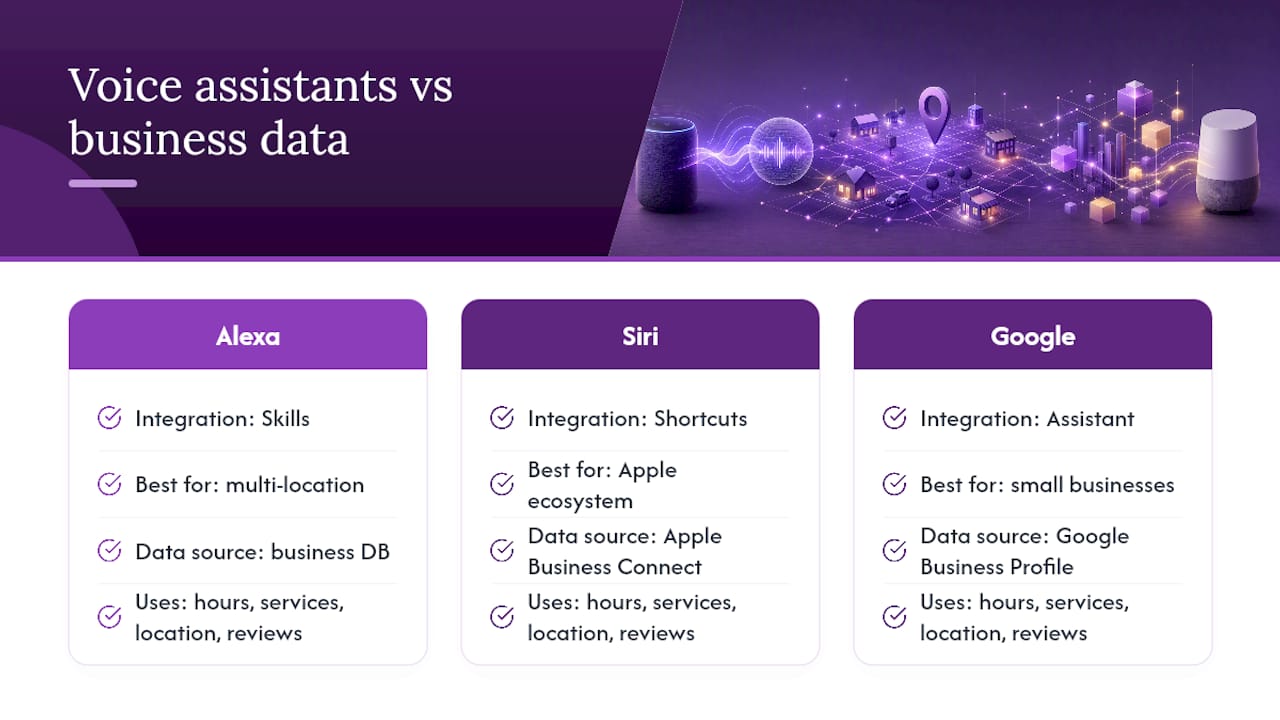
The realistic strategy for most local businesses isn’t building a custom Alexa Skill. It’s making sure the baseline data feeding all three assistants, hours, services, location, reviews, stays accurate and current. That baseline work pays off across every smart home device a customer might own, without requiring separate development for each platform.
Optimizing Natural Language and Long-Tail Keywords for Voice
Voice queries run longer and sound more like full sentences than typed searches. Someone typing searches for “plumber Chicago.” Someone talking to Google Assistant asks “who’s a good plumber near me that’s open right now.” That’s a completely different keyword shape, and optimizing for it means abandoning short-tail keyword thinking almost entirely.
The fix is building content around full questions rather than fragments. Instead of targeting “emergency plumber,” target the actual sentence: “who do I call for a burst pipe at night.” Instead of “hair salon prices,” target “how much does a haircut cost at [business name].” These longer phrases have lower individual search volume, but they match almost exactly what someone says out loud, which is precisely what gets an assistant to select your answer.
Build a running list of every long-tail, conversational phrase your team hears from actual customers, whether that’s on phone calls, in emails, or in reviews. Turn each one into its own FAQ entry or Q&A item, answered in the same tone the question was asked. This is slower than writing five generic keyword-stuffed paragraphs, but it’s the only approach that actually maps onto how voice queries are phrased.
How Assistants Choose Between GBP, Snippets, and Schema
When multiple sources could technically answer the same query, assistants generally follow a rough hierarchy, though it varies by question type and platform. For anything tied directly to business identity, hours, location, phone number, Google Business Profile and its equivalents (Apple Business Connect, Bing Places) usually win by default, since that data is structured, verified, and considered the authoritative record.
For anything more nuanced, pricing ranges, how a service works, comparisons, assistants lean toward featured snippets pulled from web content. This is where your on-site FAQ pages and schema markup earn their keep, since a business with no strong web presence has nothing for the assistant to pull from beyond the bare-bones profile facts.
Schema markup functions less as a direct ranking lever and more as a translation layer. It doesn’t force an assistant to choose your page. It makes your page easier to parse correctly once the assistant has already decided your content is a candidate. A page with the right answer but no schema can still get read aloud; a page with schema but a vague or missing answer usually won’t. The two need to work together, and businesses that only fix one of the two typically see partial results at best.
Where to Focus First: A Sequencing Question, Not a Feature List
Get the Google Business Profile and review pipeline solid before chasing featured snippets. That’s the sequencing most businesses get backwards, spending weeks building elaborate FAQ pages while their GBP hours are wrong and their reviews are two years stale. Fix the foundation first.
Whether to handle this in-house or outsource comes down to time, not budget. If nobody on your team can commit two focused hours a week for the first month, hire it out. Early wins on GBP completeness and Q&A population typically show up within 90 days. Snippet captures and schema-driven gains take longer, usually 3 to 6 months, because they depend on crawl cycles and competitive shifts that move slower than a profile edit does.
— Local
Maprank: Measuring Whether Your Voice Fixes Are Actually Working
Fixing your GBP, writing better Q&A content, and shipping schema only matters if you can prove it’s changing your visibility, and a single rank check from one location tells you almost nothing about how you’re doing three neighborhoods over. A geo-grid Google Maps rank tracking tool scans a whole service area on a customizable grid, without requiring a Google account integration for every client you manage.
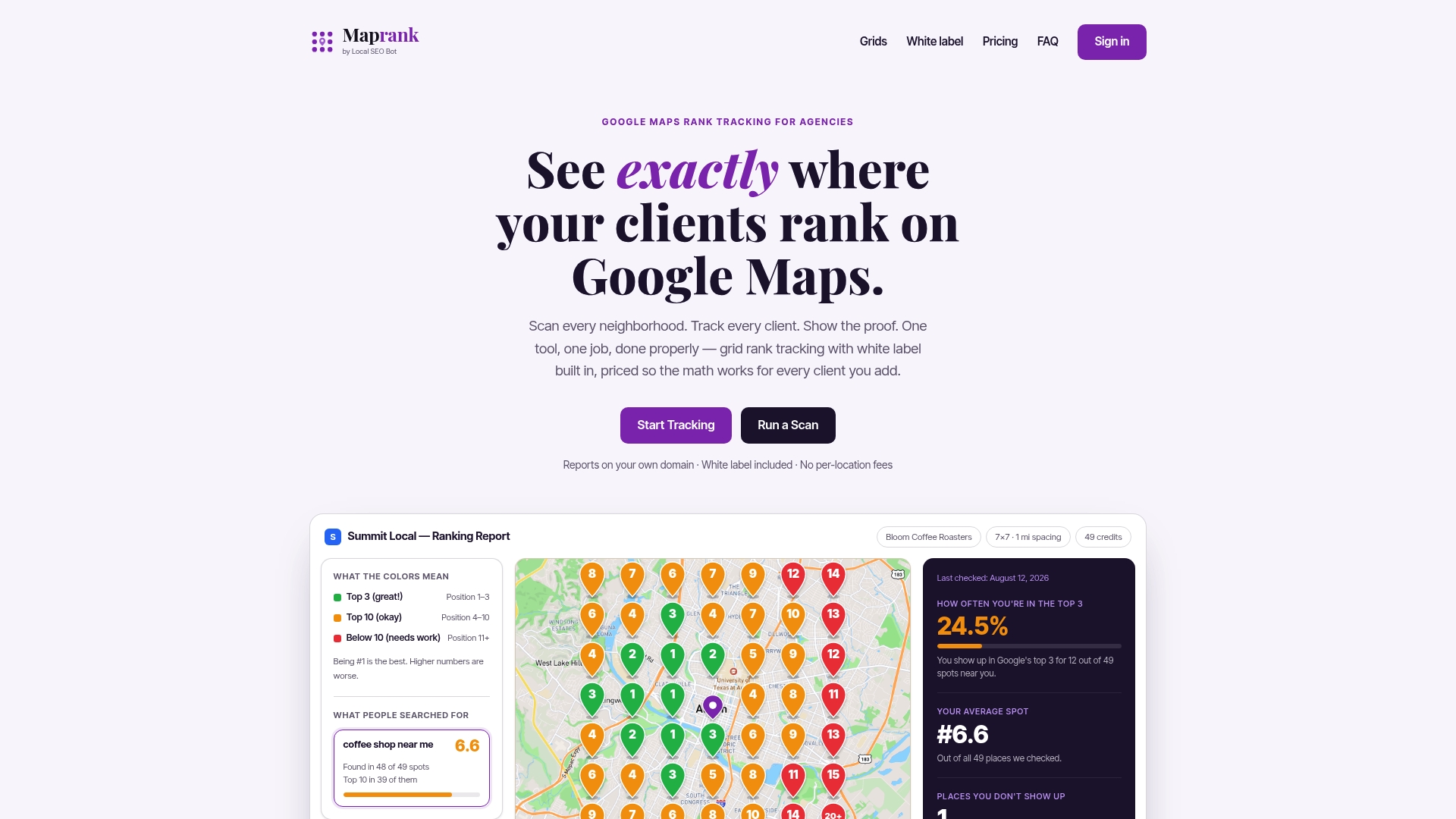
For agencies, the practical advantages stack up fast. Plans often support unlimited businesses, so you won’t pay a per-location fee for new clients. White-label reporting means client reports can carry your agency’s branding rather than a third-party tool’s. Pricing may be based on scan credits rather than complicated tiered structures, simplifying budgeting for growing client rosters.
A dedicated geo-grid tracker earns its place once you’re managing more than one or two locations, since manual spot-checks simply can’t catch the block-by-block variation that decides who wins the map pack. If you’re ready to see where your clients actually stand, start tracking your service area and run your first grid scan.
Sources
- NPR — Smart speaker ownership reaches 35% of Americans
- Statista — Voice assistant users in the United States
- Schema
- Network Solutions — Voice SEO: How voice search is transforming SEO (And how to optimize for it)
FAQ
What Is Voice Search Local SEO?
It’s the practice of optimizing your Google Business Profile, website content, and structured data so voice assistants like Google Assistant, Siri, and Alexa select your business as the spoken answer to local queries.
How Long Does It Take to See Results From Voice Optimization?
Early wins on GBP completeness and Q&A content typically appear within 90 days, while featured-snippet captures and schema-driven gains usually take 3 to 6 months to materialize.
Do I Need Schema Markup for Voice Search?
Schema doesn’t guarantee a voice answer, but LocalBusiness and FAQPage schema make it substantially easier for assistants to extract a clean answer from your existing content.
How Do I Track Whether My Business Is Winning Voice Searches?
Track calls, direction requests, and GBP impressions as proxies, and use a geo-grid rank tracker to see how your map-pack visibility varies by neighborhood rather than relying on a single rank check.
Does Apple’s Siri Use the Same Data as Google Assistant?
No. Siri draws primarily from Apple Business Connect and Apple Maps, while Google Assistant relies mainly on Google Business Profile, so both listings need separate attention.